
Quick Answer:
Most YouTubers get their music from dedicated creator music licensing platforms – either subscription services like Epidemic Sound or Artlist, or community-licensed platforms like Thematic, where creators use music for free by including a unique license link in their video description. The YouTube Audio Library is a free built-in option, though tracks tend to be overused and generic. The key is picking a source that clears Content ID claims automatically – not just music labeled “royalty-free,” which still frequently triggers claims.
If you’ve wondered where content creators source music, you’re not alone. The platform you choose directly affects your channel’s safety: the wrong source can get your video demonetized, muted, or blocked even if you paid for the track. This guide breaks down the most common sources, what to avoid, and how Thematic‘s free model compares to paid alternatives. Let’s dive in! 🎶
Explore the table of contents:
- Where YouTubers Get Their Music for Videos
- Where Not to Get Music
- Free vs Premium vs Community-Licensed Music
- How to Choose the Right Music for Your Videos
- How to Make Your Videos Sound More Professional
- Curated Music Playlists for YouTube Creators
- FAQs: Where YouTubers Get Their Music
- Final Thoughts
Sites Where YouTubers Get Their Music
Today’s creators have more options than ever when it comes to sourcing music for their videos. From creator music platforms to royalty free music and trending sounds on social media, creators have a wide range of options to find the perfect soundtrack for their videos.
Here are all the top ways YouTubers get their music for their videos.
1. Creator Music Licensing Platforms
Creator music licensing platforms (like Thematic or Epidemic Sound) are where many top YouTubers get their music that’s tailor-made for their videos. These sites focus on meeting the unique needs of video creators by offering curated, high-quality tracks that are safe to use without licensing headaches.
As a bonus, most creator music libraries connect YouTubers with songs from independent artists, providing fresh, original sounds that help your videos stand out while keeping your content copyright-safe.
Top sites where YouTubers get their music for videos:
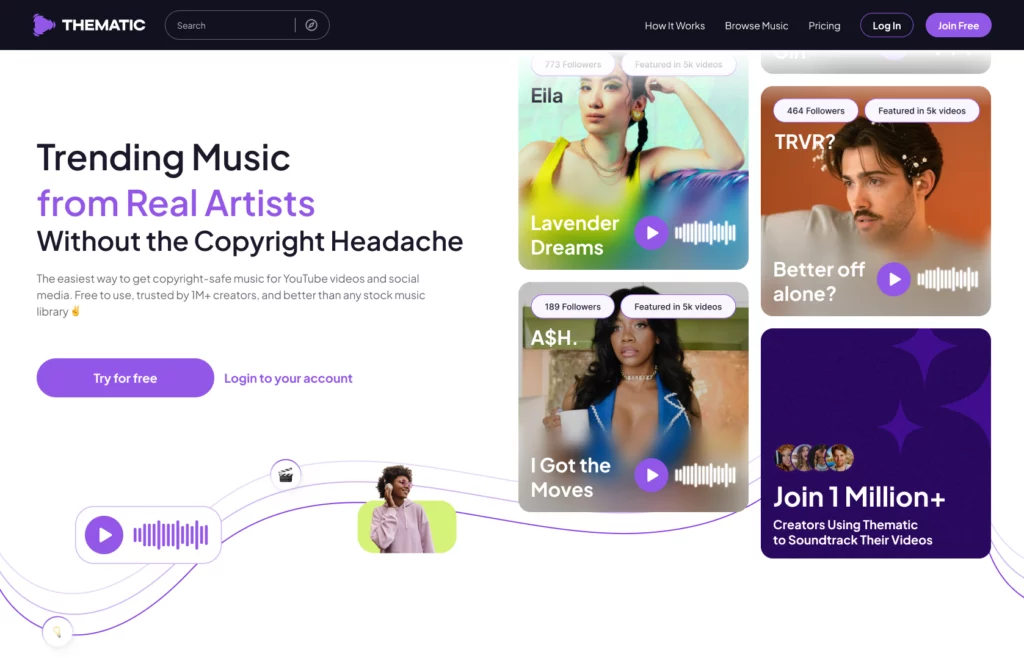
- Thematic – A free platform built for creators. Thematic’s model is genuinely different: you use music for free in exchange for including the song’s unique license link in your video description. That link is what activates your license and prevents Content ID from flagging your video. Used by 1M+ creators, co-founded with YouTube pioneer Michelle Phan.
- Epidemic Sound – Subscription-based library ($10-$15/mo) with professionally produced tracks and commercial rights for YouTube, Instagram, TikTok, and more. Past videos stay covered if you cancel; new videos cannot use the tracks after cancellation.
- Artlist – Annual subscription (~$200/yr) with broad licensing including commercial and social media use. Stronger for filmmakers and video professionals. Past projects stay licensed after cancellation; assets can’t be used in new projects.
- Uppbeat – Free and paid tiers ($5.99-$7.99/mo) with a focus on short-form content. Past videos stay covered after cancellation; no new video use.
- Soundstripe – Subscription-based with a large catalog and flexible licensing. Good for frequent uploaders across multiple platforms.
Together, these creator music licensing platforms are where many YouTubers get their music that’s fresh, high-quality, and copyright-safe.
2. YouTube Audio Library & Other Royalty-Free Music Libraries
The YouTube Audio Library is where most beginner YouTubers get their music. It offers a wide range of free tracks and sound effects that are safe to use in videos. The audio library is easy to access directly within YouTube Studio, making it convenient for quick searches and downloads.
However, while the YouTube Audio Library is free and readily available, there are some trade-offs to consider:
- The variety and quality of tracks can be limited compared to other creator music sites
- Many tracks are overused, so your videos might sound similar to others using the same library
- Licensing terms vary; some tracks require attribution, and others are restricted to non-commercial use.
- The style tends to lean toward generic or stock music, which might not fit all content types or branding needs
In addition to the YouTube Audio Library, there are other royalty-free music libraries where YouTubers get their music without worrying about copyright claims. These libraries (such as Free Music Archive, Incompetech, and Creative Commons libraries) provide a variety of songs at no cost or with flexible licensing. Keep in mind that these also come with limitations:
- Licensing terms can differ from song to song, so creators should check each song’s license details carefully.
- Quality and production values may vary.
- Some songs may require crediting the artist or may limit the use to certain video types (like not allowed in sponsored videos)
Despite these limitations, both the YouTube Audio Library and other royalty-free music libraries remain valuable resources for new creators looking to get started with copyright-safe music without paying licesning fees.
👉 To learn more about how to use the YouTube Audio Library, check out our detailed guide here.
3. Trending Sounds from Social Platforms
In recent years, social media platforms like TikTok and Instagram Reels have become major sources of music discovery and trends that spill over into YouTube content (especially for Shorts). For example, many YouTubers get their music directly from the trending songs library within these social media apps. Creators often leverage popular sounds and trending audio clips from these platforms to tap into current cultural moments and increase their video’s reach.
- TikTok Sounds: Many viral TikTok sounds are short music clips from popular songs. While these can boost engagement, it’s important to note that most TikTok sounds are not copyright-safe for all platforms, so using them outside TikTok may lead to copyright issues.
- Instagram Reels Audio: Similar to TikTok, Instagram’s trending sounds often include popular music snippets. Creators sometimes reuse these on YouTube Shorts, but again this can lead to copyright claims.
🚨 Caution: Just because a sound is trending doesn’t mean it’s safe to use on YouTube. Always check if the sound is copyright-free before adding it to your videos. Otherwise, you risk demonetization or takedowns.
✅ Pro Tip: Use song trends strategically! If you want to ride the wave of a trending sound, consider using trending song clips to boost your content discoverability, but understand the copyright implications. As an alternative copyright-safe option, look for similar sounds in licensed music libraries to capture the vibe without the copyright risk.
Trending sounds are a powerful tool for creators – but balancing trendiness with copyright safety is key to growing your channel sustainably.
⚠️ Where Some YouTubers Get Their Music (But Shouldn’t)
While there are plenty of trusted sources for royalty-free music, some of the most common places YouTubers get their music can actually lead to copyright issues. Here are a few risky sources to avoid:
🚫 SoundCloud Downloads
May YouTubers get their music from SoundCloud because it’s packed with indie artists and free downloads. But here’s the catch: just because you can download a song doesn’t mean you have the legal right to use it in your videos.
Most artists on SoundCloud retain full copyright over their work. Unless the track is clearly marked with a Creative Commons license that allows commercial use, you’re taking a risk by including it in your video. Worse, even some tracks labeled with Creative Commons licenses can still trigger YouTube Content ID claims if the uploader wasn’t the original rights holder or didn’t own the full copyright 🤦♂️
Bottom line: Unless you’ve obtained direct permission from the artist or purchased a commercial license, avoid using SoundCloud tracks in your YouTube videos.
🚫 “No Copyright” YouTube Channels
It might seem ironic, but some of the most problematic places where YouTubers get their music are actually on YouTube itself.
There are dozens of popular YouTube channels that upload music labeled as “No Copyright Music” or “Free to Use.” While some of these channels are legitimate and have proper licensing agreements with the artists, many do not.
The biggest issue with no copyright music channels is that you don’t always know who actually owns the rights to the music. Some of these channels share royalty-free music without getting permission themselves. Others promote song under unclear or misleading terms. Even if they provide a license link or ask you to credit them, the rights could still belong to someone else (or the songs could still end up in Content ID and cause copyright claims).
As a result, many creators have had their videos claimed, demonetized, or even taken down – sometimes even weeks or months or years after uploading the video. The lack of transparency around licensing from these channels is a big red flag.
At the end of the day, even though these no copyright music channels are where many YouTubers get their music, we recommend exploring options that provide actual music licenses.
✅ Pro tip: Always trace music back to a legitimate licensing source, not just a YouTube or SoundCloud upload.
🚫 TikTok or Instagram Remixes
Another increasingly popular (but risky) way YouTubers get their music is by grabbing trending remixes (like slowed-down or sped-up versions and mashups) from TikTok, Instagram, or YouTube Shorts.
These remixed audio clips may seem free to use, and different enough from the original versions, but they’re typically made from copyrighted music and YouTube’s Content ID system can still flag them. Using these types of remixes in your videos can lead to copyright claims, video demonetization, or even takedowns.
When in doubt: If a song is recognizable, it’s likely copyrighted, and edits or remixes don’t make it safe to use in YouTube videos.
✅ Play it safe: If you want to avoid copyright issues, choose platforms where YouTubers get their music legally and safely – like Thematic, YouTube Audio Library, or other official music licensing sites.
Free vs Premium Music for YouTube (and a Smarter Third Option)
When choosing music for your YouTube videos, it’s important to know not just where YouTubers get their music, but also what kind of licensing options are available. From free tracks and community-licensed music to premium subscription services, each comes with its own set of pros and cons. To help you find the best fit for your content and avoid copyright issues, here’s a clear breakdown of the main music sources creators rely on today.
| Music Type | Pros | Cons |
| Free Music (YouTube Library, SoundCloud) | ✅ Great for beginners ✅ No cost to start | ❌ Risk of overused or generic tracks ❌ Attribution often required ❌ SoundCloud sometimes not licensed for commercial use |
| Production Music Libraries (Epidemic, Artlist, Uppbeat) | ✅ Professional-grade tracks | ❌ Requires paid subscription ❌ May not fit smaller creator budgets ❌ Past videos lose access to new uploads after cancellation |
| Community-Licensed Music (Thematic) | ✅ Free forever ✅ Unique tracks from real emerging artists ✅ 1M+ creators ✅ Supports independent music artists | ❌ Must include the license link in the video description |
Here’s how the major platforms compare on pricing, sponsored content policies, and what happens to your existing videos if you stop using them:
| Platform | Price | Sponsored Content | Content ID Protection | Existing Videos After Cancellation |
| Thematic | Free forever / Premium $9.99/mo / Pro $24.99/mo | Allowed on all plans, including free | Yes – active rights management | Protected on all platforms; link model is unconditional |
| Epidemic Sound | $10-15/mo subscription | Yes | Yes | Past videos stay covered; new videos cannot use tracks |
| Uppbeat | Free + $5.99-7.99/mo paid | Paid tier only | Partial | Past videos stay covered; new videos cannot use tracks |
| YouTube Audio Library | Free | Varies by track license | Partial | No subscription; per-track attribution may still apply |
How to Choose the Right Music for Your Videos
Choosing the right soundtrack for your YouTube video goes far beyond picking the first royalty-free song you come across. Understanding how YouTubers get their music (and how they match it to their content) can make all the difference in creating videos that feel polished, engaging, and on-brand. Whether you’re editing a vlog, tutorial, or gaming montage, the right background music sets the tone and keeps viewers watching.
Below are our top tips for how to find the perfect track for your next YouTube video 🎵
🎵 Match Mood & Genre to Your Content
Your video’s vibe should guide your music choice. For example:
- Vlogs: Chill lo-fi beats, indie acoustic, or upbeat pop tracks create a relaxed, relatable atmosphere that keeps viewers connected with your personality. Think easygoing tunes that feel like background conversation music. Check out our best music for vlogs for curated picks.
- Tutorials: Instrumental or ambient tracks work best here. You want music that supports learning without distracting from voiceover or detailed visuals. Soft piano, light synths, or gentle guitar instrumentals often fit well. Explore our tutorials playlist for ready-to-use tracks.
- Gaming: High-energy electronic beats, cinematic orchestral pieces, or even rock tracks add excitement and momentum. Music that builds tension or matches action sequences helps keep your audience on the edge of their seats. Find free, copyright-safe options in our free music for gaming videos collection.
✅ Check Licensing Terms (and Avoid Copyright Claims)
Understanding licensing is crucial to avoid unexpected copyright strikes or demonetization. Even free music can come with restrictions, such as requiring attribution or limiting use in commercial projects. Here’s what to watch for:
- Attribution Requirements: Some free tracks require you to credit the artist somewhere in your video description.
- Usage Restrictions: Certain licenses may prohibit use in sponsored content, branded videos, or monetized channels.
- Territory & Platform Limits: Some licenses are limited to specific countries or platforms.
👍 Platforms like Thematic handle licensing automatically – your license is activated the moment the unique license link is live in your video description. This ensures your music use is fully compliant, giving you peace of mind.
How Content ID Works (and Why It Matters)
YouTube’s Content ID system automatically scans every uploaded video against a database of registered audio fingerprints. When a match is found, the rights holder can monetize your video (redirecting your ad revenue to them), restrict it in certain countries, or block it entirely. This happens regardless of whether you paid for a “royalty-free” track – many royalty-free libraries are still registered in Content ID and generate claims.
Thematic works with artists to register their catalog in a way that recognizes valid Thematic license links. When the link is present in your video description, Content ID identifies your license and does not trigger a claim. This is stronger protection than most royalty-free libraries offer.
👀 See What Other Creators Are Using
One of the best ways to find out how your favorite YouTubers get their music, is to check their videos and see what songs they’re using!
- Look in their video descriptions for music credits or links to the tracks they use.
- Notice if they often use specific platforms or artists – this can lead you to new music sources that work well in your niche.
- Creators using Thematic always include their song license link in their video description, making it super easy for viewers to learn more about the featured music, and start using it in their own videos themselves.
By paying attention to what others are using, you not only stay inspired but also get a clear sense of trending sounds and styles that resonate with audiences. This approach helps you keep your content fresh, engaging, and in tune with what’s working right now – making it easier for you to find the perfect music to elevate your videos.
👉 Did you know that most YouTubers get their music ideas from watching and listening to other creators? It’s a natural part of the creative process to find inspiration in what others are doing, especially when it comes to selecting music that sets the tone and vibe of a video.
How to Make Your Videos Sound More Professional with Music
Want to take your videos to the next level? One of the easiest ways to make your content feel polished and professional is by mastering how you use music. The right soundtrack can set the mood, enhance storytelling, and keep viewers engaged from start to finish.
Below are some practical tips to help you make your videos sound more professional with music – from syncing edits to the beat, to balancing audio levels, and using intros and outros effectively.
⏱️ Match Your Cuts to the Beat
Timing your video edits to the rhythm of your music creates a natural flow that’s satisfying to watch. Syncing key cuts or scene changes to the song’s beats or downbeats makes your video feel polished and intentional. This technique helps maintain viewer engagement and reinforces the mood you want to convey.
🎬 Use Intros and Outros Thoughtfully
Consider adding short music clips at the start and end of your videos. Intros can set the tone and hook your audience immediately, while outros leave a lasting impression. Using consistent sounds or themes helps build your brand identity over time, making your content instantly recognizable.
🔉 Don’t Let Music Overpower Dialogue
When your video includes voiceovers, interviews, or dialogue, it’s essential to balance the audio levels. Lower the music volume during speaking parts to ensure clarity, and use smooth fade-ins and fade-outs to transition between music and speech. This keeps the message clear and professional without awkward audio clashes.
🎧 Use Audio Layers Wisely
Incorporate subtle background sounds or ambient tracks behind your main music to add depth without overwhelming the main audio. Experiment with layering soft instrumentals or nature sounds depending on your content style.
🎚️ Test on Different Devices
Audio can sound different on headphones, laptop speakers, or smartphones. Always preview your video on multiple devices to ensure your music and dialogue mix well across platforms.
Curated Music Playlists for YouTube Creators
Ready to find your next favorite track? Check out these creator-specific playlists on Thematic – curated to fit your content style and make your editing process smoother:
- 🤳 Music for Vlogs – Looking for the best background music for vlogs? These chill, upbeat, and mood-setting tracks are perfect for storytelling and daily updates.
- 🎮 Gaming Background Tracks – Need epic background music for your gaming videos? This playlist features high-energy beats and immersive soundscapes to keep your gameplay exciting.
- ✈️ Travel Aesthetic – Background music can make or break a travel vlog. Enjoy our picks for the best vibey, chill songs for all your aesthetic travel vlogs.
- 📱 Reels, Shorts & TikToks – Music is essential for short-form content. These trendy, catchy tunes will help your short-form videos on Instagram, TikTok, and YouTube stand out.
With Thematic, you can explore music by vibe, genre, or video type, without worrying about licensing headaches or unexpected copyright strikes. Plus, every song comes with easy-to-use artist crediting, helping you support independent music artists while making your videos sound amazing.
Where YouTubers Get Their Music FAQs ✌️
Still have questions about where YouTubers get their music or how to use it in your own videos? You’re not alone – music licensing and sourcing can get confusing fast. These quick answers cover the most common questions creators ask, so you can spend less time researching and more time creating.
What types of music do YouTubers use in videos?
Popular genres include lo-fi beats, indie pop, cinematic instrumentals, chill ambient tracks, and upbeat electronic, usually chosen to match the content type. Vloggers tend to use lo-fi or indie acoustic; gaming creators lean toward high-energy electronic or orchestral; travel creators favor vibey, atmospheric tracks. Platforms like Thematic organize their catalog by mood and creator niche to make discovery faster.
How do YouTubers add music to their videos?
Creators usually download a licensed track, import it into their video editing software (like CapCut, Final Cut Pro, or Premiere Pro), and then sync it with cuts, transitions, or dialogue. Many adjust the track’s volume and timing during the final edit.
Can I use Spotify or Apple Music songs in my YouTube videos?
No. Music from Spotify, Apple Music, or other streaming platforms is not licensed for use in YouTube videos. These platforms are for personal listening, and using their music in videos can result in copyright claims or takedowns.
Is it safe to use popular songs if I only use a few seconds?
Not always. Even short clips of copyrighted music can trigger Content ID claims or lead to demonetization. If you want to use trending sounds, it’s safer to use pre-cleared music from platforms like Thematic, or look for royalty-free alternatives with a similar vibe.
What music sites do YouTubers use?
The most commonly used platforms are Thematic (free, license-link model with unique tracks from emerging artists), Epidemic Sound (subscription, $10-$15/mo), Artlist (annual subscription, broad licensing), Uppbeat (free and paid tiers), and the YouTube Audio Library (free, built-in). The right choice depends on your upload frequency, budget, and whether you need coverage across multiple platforms beyond YouTube.
Where do YouTubers get trending music that’s safe to use?
Platforms like Thematic regularly surface new releases from emerging artists, so creators can use tracks that feel current without the copyright risk of pulling directly from Spotify or TikTok. Thematic’s catalog is curated by mood and niche, making it practical to find trending-sounding music that fits your content style and is cleared for YouTube, Instagram, and TikTok.
👉 Did you know that trending songs like Nicky Youre’s “Sunroof”, EVAN GIIA’s “Westworld”, and Lauv’s “I Like Me Better” all got their start on Thematic (and were available for creators to use copyright-free)? These songs helped creators ride the wave of trending music while avoiding copyright claims, all thanks to Thematic’s artist-first approach to music licensing.
What background music do vloggers use?
Vloggers typically choose upbeat, aesthetic, and mood-enhancing background music that fits their video’s tone and style. The songs used in vlogs should set the tone for your video and enhance your footage.
For a great selection of tracks and tips on choosing the perfect music for your vlog, check out Best Music for Vlogs post featuring the top trending songs that vloggers love to use in their videos.
Do creators need to credit the artist?
It depends on the platform. Thematic requires you to include a unique license link in your video description for each song – this is not just a courtesy credit, it is what activates your legal license and prevents Content ID claims. Epidemic Sound, Artlist, and Uppbeat do not require attribution, but they charge monthly or annual subscription fees. The YouTube Audio Library sometimes requires attribution depending on the specific track’s license.
How do YouTubers find licensed music?
Most creators use dedicated music licensing platforms – Thematic, Epidemic Sound, Artlist, or Uppbeat – that provide pre-cleared tracks with explicit commercial rights for YouTube. The key is confirming that the platform actively manages Content ID registration, not just that it labels music “royalty-free.” Reading the licensing terms for each platform (especially around sponsored content and multi-platform use) before committing to a subscription saves headaches later.
For a detailed guide on using copyrighted music safely on YouTube, check out How to Use Copyrighted Music on YouTube.
What happens if I get a copyright claim on my video?
A YouTube copyright claim may lead to your video being demonetized, muted, blocked in certain countries, or even taken down. It depends on the rights holder’s policy. Using licensed music from trusted sources helps you avoid this risk.
In the case you did receive a copyright claim when using music in your video, check-out our guide on how to fix copyright claims here.
What’s the best free option for YouTube music?
Thematic is the strongest free option for creators who want unique, high-quality music from real emerging artists. The trade-off is including a license link in every video description. The YouTube Audio Library is the easiest starting point since it’s built into YouTube Studio, but the catalog is limited and tracks are heavily overused across the platform. For creators who want to stand out sonically without paying a subscription, Thematic is the more practical long-term choice.
You can also explore our list of the top free music websites where YouTubers get their music here.
What is the difference between a copyright claim and a copyright strike on YouTube?
A copyright claim (also called a Content ID match) means the rights holder has claimed your video and may redirect your ad revenue, restrict viewership, or add tracking. It does not penalize your channel directly. A copyright strike is a formal legal complaint that affects your channel standing – three strikes result in channel termination. Most music-related issues are claims, not strikes. Licensed music from platforms like Thematic prevents both.
Final Thoughts
Finding the right music comes down to three things: matching the track to your content style, confirming the licensing actually protects your channel from Content ID, and deciding whether you want to pay a subscription or include a license link.
Thematic handles all three without a monthly fee. The YouTube Audio Library is the zero-friction starting point. Epidemic Sound and Artlist are worth it for creators who upload frequently and want more catalog depth.
Whichever route you choose, verify that the platform actively manages Content ID – not just that it labels tracks “royalty-free.”
And now that your “in the know,” before long, new creators wondering how YouTubers get their music will be turning to your video for inspiration!
🎵 Ready to find your next video soundtrack? Explore free music on Thematic and sound better, faster.
Still Deciding?
- How Thematic Works: The Promo Link Model Explained
- Thematic vs Epidemic Sound: Full Comparison for Creators
- How to Use Copyrighted Music on YouTube (Without Getting Claimed)
- What to Do If You Get a YouTube Copyright Claim
- Is No-Copyright Music Actually Safe? – why tracks labeled “copyright-free” still trigger Content ID claims
- AI Music for YouTube – whether AI-generated music resolves the copyright problem
Looking for more free creator tools and resources? Visit Thematic’s Creator Toolkit for additional resources on creating content – including thumbnail and channel art templates, best practices, and of course, great royalty free songs to use in your videos for free with Thematic.

This post on Where YouTubers find Their Music is brought to you by Thematic Director of Partnerships, Stephanie Leyva
Stephanie Leyva sits at the intersection of music artists and content creators. As the Director of Partnerships at Thematic, Stephanie has worked extensively with the artist and creator community on the site to ensure success digitally, on the platform, and support their initiatives.
Over the past few years, she has led numerous trending music-driven influencer marketing campaigns for “Glitter” and “Supalonely (feat. Gus Dapperton” by BENEE, “Loneliness for Love” by Lovelytheband, “Checklist (feat. Chromeo)” by MAX and so many more. She’s worked alongside various labels such as Casablanca Records, Republic Records and Sony Music. Focused on empowering connections between content creators and music artists, Stephanie continues to lead the charge in innovative music discovery through social.
Stephanie is also the creator of the Bloom In Progress podcast – a podcast about personal growth, relationships and navigating life in your 20’s.