
You just filmed the perfect TikTok. The lighting is great, your timing is on point, and the content is genuinely good. You post it – and then you get the notification nobody wants: your video has been muted due to a music copyright issue.
Sound familiar? You are definitely not alone.
Adding music to TikTok sounds simple, but there is more to it than just tapping a sound and hitting post. Between personal accounts, business accounts, the general Sounds library, the Commercial Music Library, and a copyright system that works completely differently from YouTube – it can get confusing fast.
This guide walks you through everything: how to add music to TikTok directly in the app, how to add it before you upload using an editor, and how to make sure the music you choose will never get your video muted, flagged, or taken down. By the end, you will know exactly which music is safe for your specific account type and how to find great tracks you can use everywhere – TikTok, YouTube, Instagram, and beyond.
Table of Contents
- TikTok Music – What You Need to Know First
- How to Add Music to TikTok In-App (Native Method)
- How to Add Music to TikTok Before You Upload (Editor Method)
- TikTok Copyright Rules – What’s Actually Safe?
- The Easiest Way to Add Copyright-Safe Music to TikTok
- Best Types of Music for TikTok Videos
- FAQs
- Before You Hit Post
TikTok Music – What You Need to Know First
TikTok is, at its core, a sound-first platform. It was literally built around music. Audio is not an afterthought here – it is part of what makes content go viral, get discovered, and land on the For You Page. Videos with music consistently outperform those without it, and trending sounds can be a major algorithmic boost.
But here is the catch: TikTok’s music rules are strict, they are different from YouTube’s, and they vary depending on what type of account you have.
TikTok has two separate music libraries, and which one you can legally access depends entirely on whether your account is a personal (creator) account or a business account. Getting that wrong is the number one reason creators end up with muted videos and account flags.
One more rule that catches nearly every creator off guard: TikTok caps music at 60 seconds per video, for both libraries and for any audio you upload yourself. Videos with more than 60 seconds of music are typically auto-muted – even if you brought the audio in from your own camera roll.
There is also a common misconception worth clearing up immediately: a music license that covers YouTube does NOT automatically cover TikTok. These are separate platform rights, and many creators have learned that the hard way. We will break all of this down in detail – but first, let’s actually walk through how to add music to your videos.
How to Add Music to TikTok In-App (Native Method)
The fastest and most straightforward way to add music to TikTok videos is directly inside the app. Here is how it works.
📋 Step-by-Step on Mobile (iOS and Android)
The process on how to add music to TikTok videos is the same whether you are on iPhone or Android:
- Open TikTok and tap the “+” button at the bottom center of the screen to open the camera.
- Record a new video or tap “Upload” in the bottom right corner to select an existing video from your camera roll.
- Once your video is ready, tap “Next” to move to the editing screen.
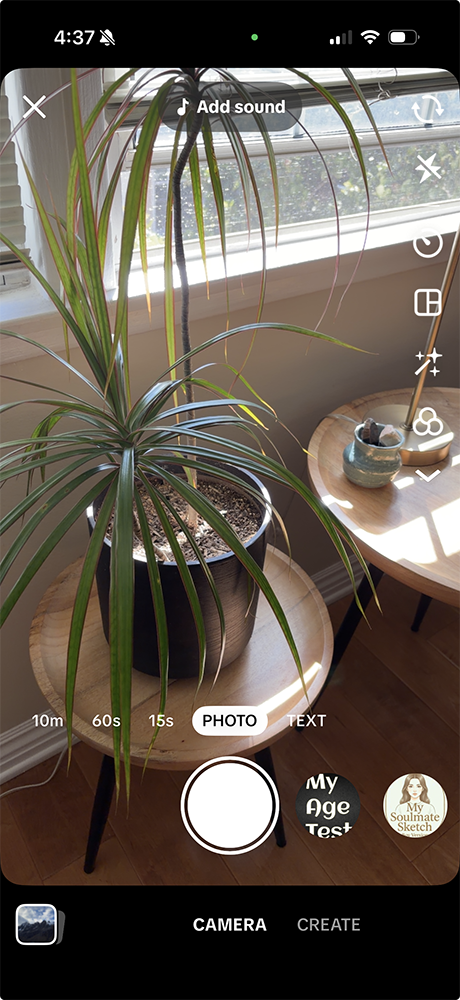
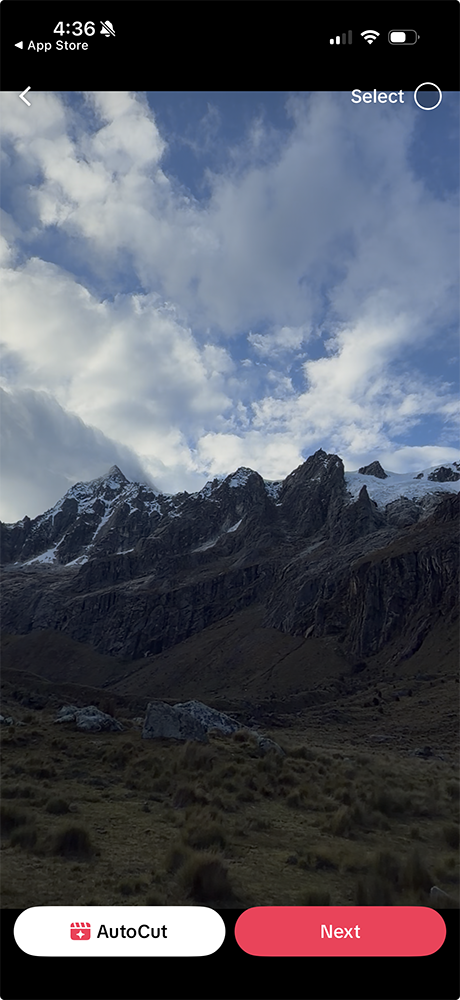
- At the top of the editing screen, tap “Add sound” (you will see it near the top of the screen with a musical note icon).
- This opens TikTok’s music browser. Search for a specific song by name or artist, or browse the curated playlists and trending sounds.
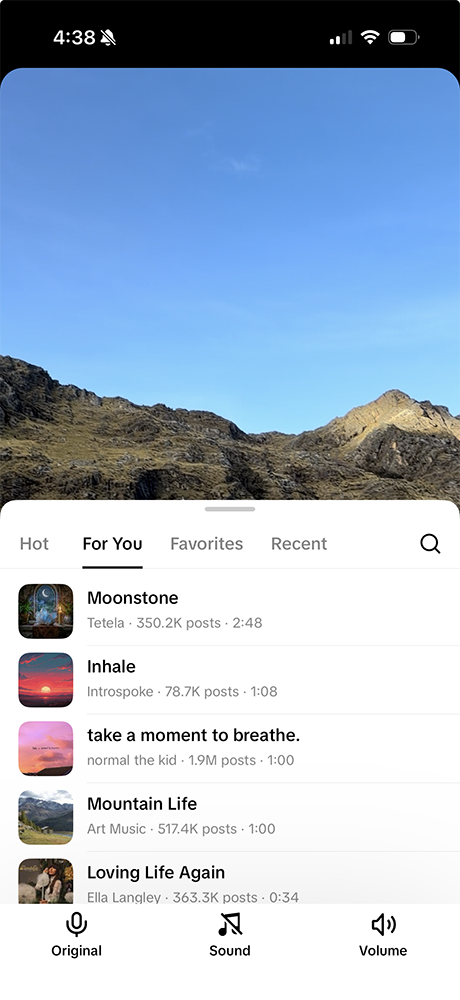
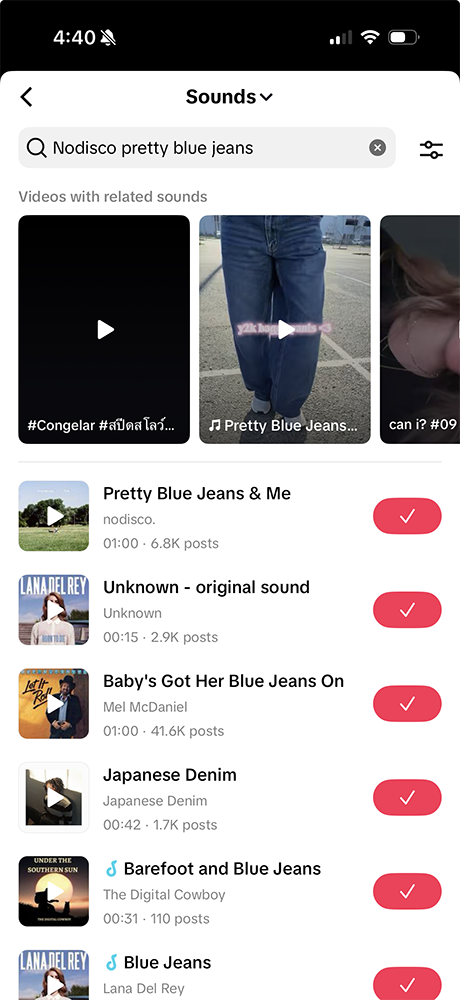
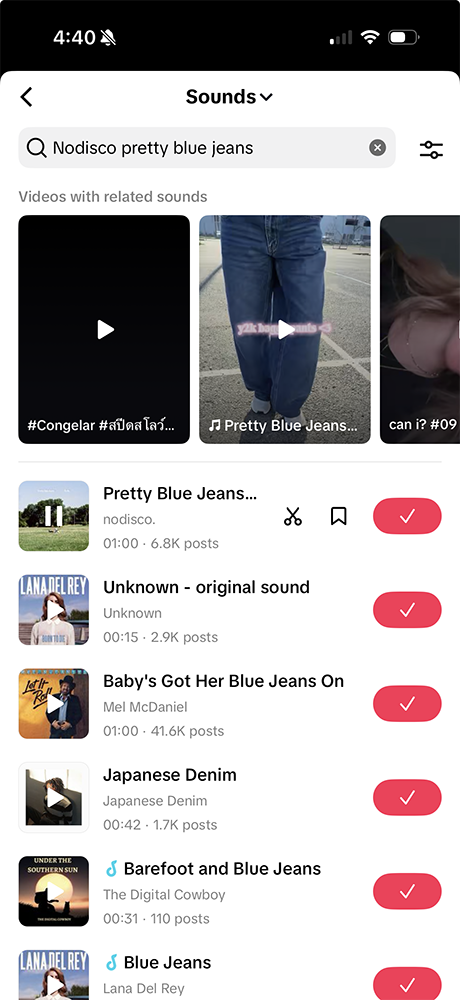
- Tap a track to preview it. When you find one you like, tap it again to select it.
- Use the scissors/trim icon to choose which part of the song plays in your video.
- Adjust the volume balance between your original video audio and the music using the volume controls.
- Click the checkmark icon to add it to your video
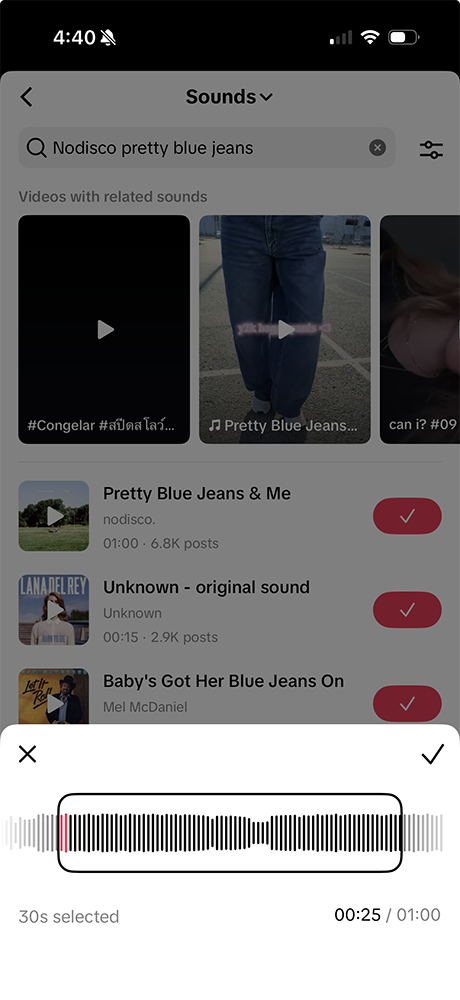
- Tap “Done” and continue editing or proceed to post.
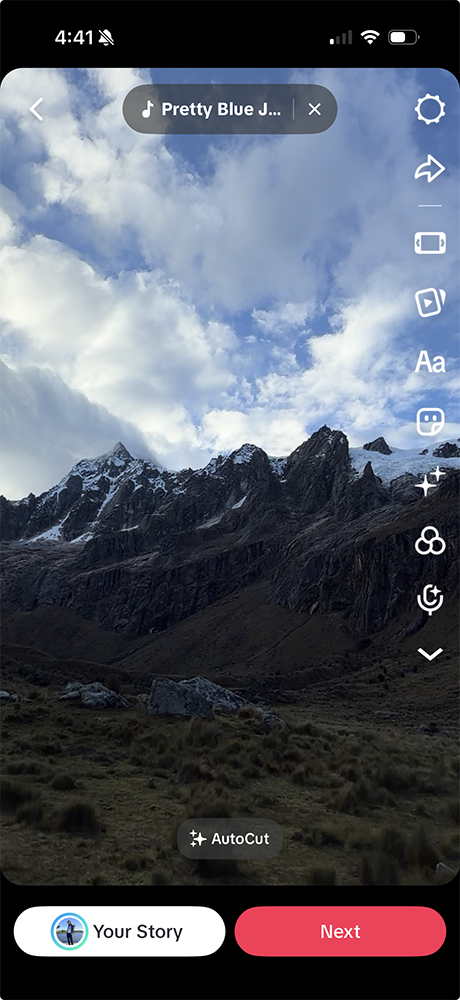
That’s it. The whole process takes about 30 seconds once you know what you are doing.
👉 One important note: If you are adding music to a video you recorded inside TikTok (using TikTok’s camera), you can also add a sound before you record by tapping “Add sound” at the top of the camera screen. This lets you film to the beat and sync your content to music from the very start.
Using TikTok’s Sounds Tab
Inside the music browser, TikTok organizes sounds a few different ways to help you find the right track:
- Recommended – Tracks TikTok’s algorithm thinks suit your content
- Trending – Sounds that are going viral on the platform right now
- Playlists – Curated collections by mood, genre, and content type (Gaming, Fitness, Vlog, etc.)
- Favorites – Sounds you have bookmarked from other TikToks you have seen
- Recently Used – Your personal playback history, great for staying consistent
The Favorites feature is especially useful. Whenever you see a video with a sound you love, tap the sound name at the bottom of the video and save it to your favorites. That way, when you are ready to post, your go-to tracks are already waiting.
⚠️ Important: The full Sounds library (including trending chart songs and popular audio) is available to personal accounts only. If you have a business account, you will not see these tracks. More on that in a moment.
Using TikTok Templates (Auto-Format Your Clips to Music)
If you want a faster path to a polished, music-synced video, TikTok’s Templates feature does the editing for you. Tap “+” on the home screen, then select “Autocut” at the bottom of the camera screen. Browse pre-built layouts – each one is already set to a specific song and transition style. Select a template, upload the photos or video clips it asks for, and TikTok auto-formats your media to fit the music and timing.
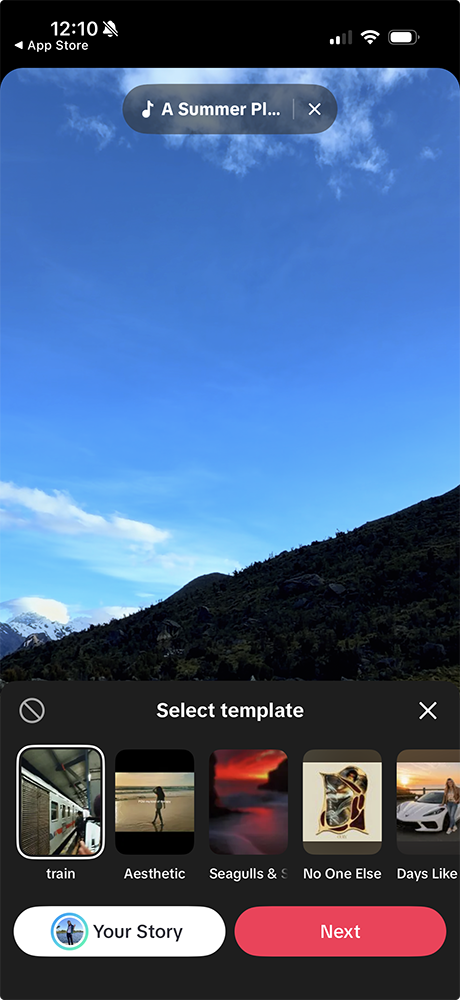
Templates are especially popular for photo slideshows, travel content, and multi-clip lifestyle videos. The music is pre-cleared for use in TikTok since it is baked into the template. The trade-off is that you have no control over the track – you pick the template, and the music comes with it.
Using TikTok’s Commercial Music Library (What It Is, Who Can Access It)
The Commercial Music Library (CML) is TikTok’s separate, pre-cleared music catalog specifically built for business accounts and any content with a commercial purpose.
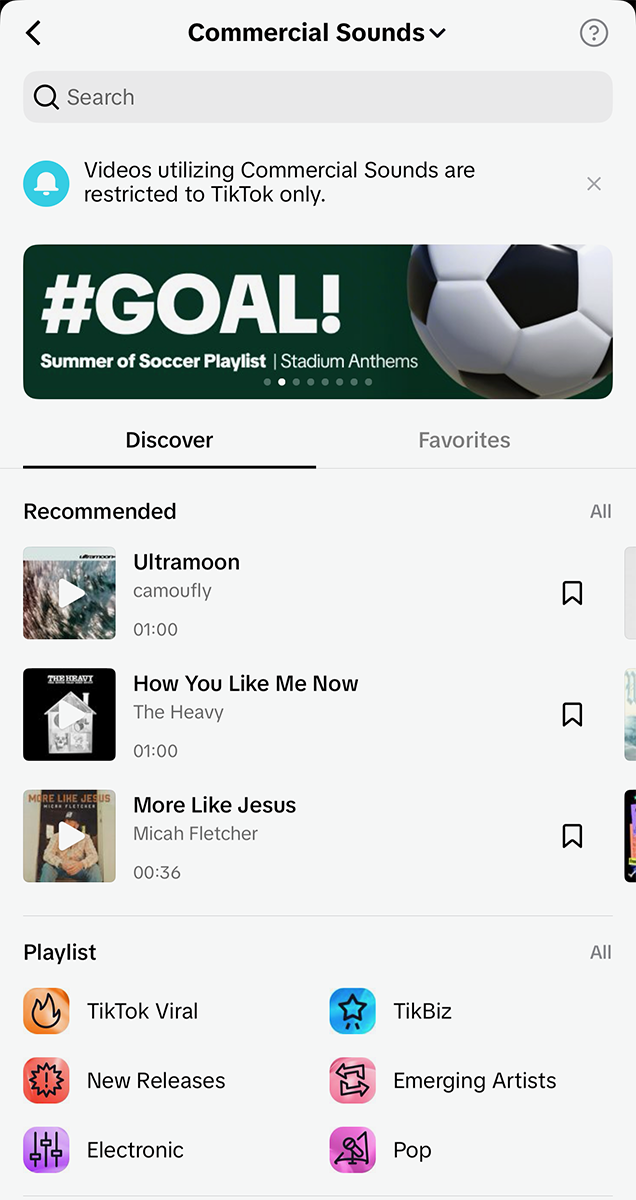
Here is what you need to know about it:
- Who can access it: Business accounts, brand accounts, and any creator running paid promotions or brand partnerships. On mobile, you access it by tapping “Add sound” and selecting “Commercial Sounds.”
👉 See TikTok’s official Commercial Music Library documentation for the full list of eligible content types.
- What it contains: Over 1 million tracks across all genres, moods, and styles – sourced from independent artists and music licensing houses. It is genuinely a solid library.
- Why it exists: TikTok’s licensing agreements with major labels (think Universal, Sony, Warner) typically cover personal, non-commercial use only. When money or brand promotion is involved, those licenses do not apply. The CML uses tracks that have been specifically cleared for commercial use.
- The limitation: The CML is smaller and does not include the chart-topping pop hits and trending viral sounds available to personal accounts. That is the trade-off.
- Platform restriction: Music from the CML is only licensed for use within TikTok. If you download your video and post it to YouTube or Instagram with that audio, you are no longer covered.
If you have a business account, the CML is your go-to for all native TikTok music. If you need music that works across platforms – which most creators do – keep reading, because we have a better solution for you later in this post.
💡 Did you know? Many of the songs available on Thematic are also available in TikTok’s Commercial Music Library. Browse the TikTok Approved for Sponsored Content playlist – every track is brand-safe, commercially cleared, and searchable directly in the TikTok CML.
How to Add Music to TikTok Before You Upload (Editor Method)
TikTok’s in-app editor is convenient, but it is not the only way to add music to TikTok videos – and for many creators, it is not even the preferred way.
Why Creators Use Third-Party Editors First
A large number of creators edit their videos fully in a third-party app before they ever open TikTok. Here is why:
- More control over timing and sync. Third-party editors give you frame-level precision when matching your cuts to a beat, which is much harder to achieve in TikTok’s native editor.
- Freedom to use your own licensed music. If you have sourced copyright-safe music from a platform like Thematic, you can drop it directly into your edit. That music travels with the video file when you upload to TikTok – and since you own the license, you are covered.
- Consistent audio across platforms. When you add music inside TikTok, that audio is only licensed for TikTok. If you edit with your own licensed tracks before uploading, you can post the same video to YouTube, Instagram Reels, and TikTok without needing separate music for each.
- No creative constraints. TikTok’s native editor is improving, but dedicated editing apps offer far more flexibility – transitions, layered audio, effects, color grading, and more.
The pre-upload editing workflow is especially popular among creators who cross-post content or who want to maintain a consistent style and sound across their channel.
How to Add Music to TikTok Using CapCut
CapCut is the most widely used third-party editor among TikTok creators. Edit your video in CapCut first – adding music directly to your timeline using either CapCut’s built-in library or your own licensed tracks – then export and upload the finished file to TikTok. Your audio is baked in, so you do not add a second sound inside TikTok.
👉 For the full walkthrough (mobile and desktop, layering audio, beat sync, and using your own files) see our dedicated guide: How to Add Music to CapCut.
TikTok Copyright Rules – What’s Actually Safe?
This is the section that can save you a lot of frustration. TikTok’s copyright system is more nuanced than most creators realize, and the rules apply differently depending on your account type and how you are using your content.
Personal vs. Business Accounts – Why It Matters for Music
This distinction is arguably the most important thing to understand about TikTok music:
🕺 Personal (creator) accounts have access to TikTok’s full Sounds library, which includes millions of songs – including major label chart hits and trending audio. For purely personal, non-commercial content, TikTok has existing licensing agreements that cover most of these tracks. That does not mean everything is cleared for every use, but for casual, non-monetized creators, the general library is reasonably safe.
👔 Business accounts have a completely different situation. Because TikTok’s licensing agreements with major labels typically cover personal use only, businesses cannot use the general Sounds library. If you have a business account, you are restricted to the Commercial Music Library – period. Using sounds from the general library on a business account is a violation of TikTok’s terms, regardless of whether the video is technically available in the Sounds tab when you browse.
This also affects creators who run branded content. Even if you have a personal account, using music from TikTok’s general library in a sponsored post or paid partnership is not covered. Branded content requires Commercial Music Library tracks or separately licensed music.
The practical takeaway: if you are a business, a brand, or a creator who does sponsored content, you need music that is cleared for commercial use – either from the CML or from a platform that provides a proper license.
The 60-Second Music Limit on TikTok
TikTok’s licensing agreements cap music at 60 seconds per video. This applies to tracks from both the general Sounds library and the Commercial Music Library. Videos with more than 60 seconds of music are typically auto-muted or blocked by the platform.
What catches creators off guard: the limit also applies to audio you upload directly – not just tracks selected from TikTok’s in-app libraries. If you pre-edit a video with a full music bed and upload it from your camera roll, TikTok’s content recognition can still trigger the mute at the 60-second mark.
The practical implication: if your video runs longer than 60 seconds, keep your music within a single 60-second window, cut to a different track, or use licensed music from a platform like Thematic that is not subject to TikTok’s in-app licensing restrictions.
What Happens When You Use Unlicensed Music on TikTok
TikTok uses automated content recognition technology – similar to YouTube’s Content ID – to scan videos for copyrighted audio. Here is what can happen if your video triggers a match:
- Video muted: Your video stays up but the audio is removed. Viewers see a silent video, which is essentially dead content on a sound-first platform.
- Video removed: The rights holder or TikTok can take down your video entirely.
- Account strikes: Repeated violations accumulate strikes against your account.
- Reduced algorithmic reach: Even before a formal strike, flagged content often gets suppressed in distribution. TikTok’s algorithm is less likely to push content that has been flagged, which quietly kills your reach without a visible notification.
- Monetization impact: If you are in TikTok’s Creator Rewards Program or working toward eligibility, copyright violations can affect or remove that status.
The muting scenario is especially painful because it can happen after a video has already started performing well. TikTok’s systems do not always catch violations immediately, which means a video can gain traction, start going viral, and then get muted mid-run. That momentum disappears instantly.
TikTok vs. YouTube Copyright – Key Differences
If you also post to YouTube (and most serious creators do), it is worth understanding that these platforms handle music copyright in meaningfully different ways.
TikTok’s approach:
- Has direct licensing deals with many major labels, which is why personal account users can use popular music in casual content.
- Violations typically result in muting or removal rather than immediate monetization claims.
- Business accounts face stricter rules than personal accounts.
- The CML is limited to TikTok use only – it does not carry over to other platforms.
YouTube’s approach:
- Uses Content ID, which allows rights holders to choose what happens when their music is detected: claim the revenue, block the video, or allow it.
- A video using unlicensed copyrighted music is more likely to get demonetized (ad revenue goes to the rights holder) than taken down.
- YouTube’s Audio Library provides free music for use on YouTube specifically.
- A YouTube license does NOT cover TikTok, and a TikTok license does NOT cover YouTube.
The biggest practical difference: a license for one platform does not transfer to another. If you want to post the same video everywhere, you need music with a license that explicitly covers each platform – or you need music from a source that licenses across all of them at once. (More on that shortly.)
For a deeper look at YouTube’s copyright rules and how to navigate them, see our guides on music for YouTube videos and how to use copyrighted music on YouTube.
The Easiest Way to Add Copyright-Safe Music to TikTok
Here is a question worth asking: what if you did not have to think about copyright at all?
That is the whole idea behind Thematic.
Thematic is a music licensing platform built specifically for content creators. Instead of navigating the patchwork of per-platform licenses, account restrictions, and confusing rights negotiations, Thematic gives you access to a library of trending, high-quality tracks that are cleared for use everywhere – TikTok, YouTube, Instagram, podcasts, and more – in one place.
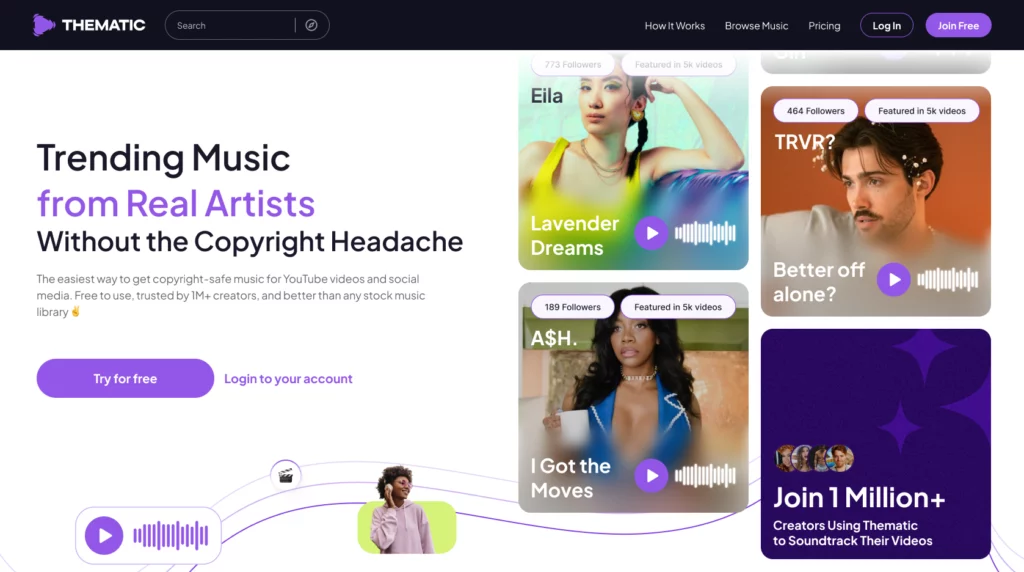
Here is what makes Thematic different:
- Trending tracks from real artists. Thematic works directly with independent artists to offer music that sounds current, professional, and on-trend – not the generic royalty-free filler you find on most free licensing sites.
- Lifetime license. When you use a Thematic track, your license does not expire. You do not have to worry about relicensing or having a video suddenly fall out of compliance months after you post it.
- Video protection. Thematic’s license covers you even when your content drives traffic through an artist credit in your video description – a detail that matters more than most creators realize.
- Cross-platform coverage. One license, every major platform. No more hunting for separate music for TikTok vs. YouTube vs. Instagram Reels.
- Free to start. You can access Thematic’s library and start using tracks at no cost to get started.
Join 1M+ creators already using Thematic to keep their content sounding great and their accounts protected. Start for free at hellothematic.com.
If you are serious about growing your channel – and especially if you are working toward monetization on TikTok – having a clean music record is non-negotiable. Check out our guide to monetizing on TikTok to see exactly why copyright compliance from day one makes your path to monetization a lot smoother.
Best Types of Music for TikTok Videos
Knowing how to add music to TikTok videos is only half of it. Knowing which music to add is what separates forgettable content from videos people actually watch all the way through and share.
Trending Sounds vs. Licensed Tracks
There is a real tension here that every creator navigates:
🎉 Trending sounds – the viral audio clips, popular song snippets, and meme sounds circulating on TikTok at any given moment – have genuine algorithmic advantages. TikTok’s system recognizes trending audio and actively surfaces content using it to users who have engaged with that sound before. Using a trend can get you in front of audiences you would never otherwise reach.
The downsides: trending sounds cycle in and out of popularity fast. A sound that is everywhere this week might be played out next week. If you are a business account, you often cannot use these sounds at all. And because everyone is using the same audio, it can be harder for your specific content to stand out within that sea of similar videos.
✅ Licensed tracks from platforms like Thematic give you different advantages: consistency, cross-platform use, no copyright risk, and a more distinctive sound identity. Instead of blending in with every other creator using the same trending audio, you build a recognizable audio brand. Your regular viewers start to associate your content with a particular feel and sound – and that builds loyalty over time.
The smartest approach: use trending sounds when it makes sense for your content and your account type, and use licensed music as your foundation for everything else.
How Music Genre Affects TikTok Performance
TikTok audiences respond differently to different genres, and being intentional here can make a real difference in your watch time and engagement metrics.
- Pop and upbeat tracks work especially well for lifestyle, fashion, beauty, food, and travel content. High energy keeps viewers engaged and sets a positive tone.
- Hip-hop and R&B are staples for fitness content, urban lifestyle, transformation videos, and anything with a confident edge.
- Lo-fi and ambient music tends to perform well for study content, relaxing ASMR-adjacent videos, aesthetic content, and anything slow-paced and meditative.
- Electronic and EDM is a natural fit for gaming, tech, fast-cut edits, and anything high-energy or visually intense.
- Acoustic and indie folk often resonates deeply in storytelling, emotional content, mental health conversations, and personal vlogs.
Think about the emotion you want viewers to feel during your video, then choose music that supports that emotion. Mismatched music is one of the most common and most damaging mistakes creators make – a sad story with upbeat music, or a funny moment with dramatic scoring, undermines the content instead of amplifying it.
Tips for Matching Music to Content Type
A few practical principles that consistently work:
Match the energy, not just the genre. A mid-tempo acoustic song can work in a fitness video if the energy of the performance matches the music. Do not lock yourself into genre rules – lock into energy and emotion.
Cut to the beat. TikTok is a visual-music platform. When your cuts and transitions land on the beat of the music, it feels intentional and satisfying. Viewers respond to this even if they do not consciously notice it – it is the difference between a video that feels polished and one that feels rough.
Use the drop strategically. If your song has a build-and-drop structure, save your most visually compelling moment for when the drop hits. Reveal shots, transformation moments, and punchlines land harder when they are timed to a musical climax.
Start strong. TikTok’s algorithm heavily weights watch time, and the first two seconds are critical. Music that starts immediately with energy – rather than a slow intro – helps hook viewers before they can scroll past.
For more on how to optimize your content for TikTok’s algorithm and maximize how many people see your videos, see our guide to maximizing TikTok views.
FAQs about how to add music to TikTok videos
Common questions about how to add music to TikTok, account restrictions, and copyright rules.
Can I use any song on TikTok?
Not exactly. Whether you can use a song depends on your account type and how you are using your content. Personal accounts can browse TikTok’s full Sounds library for non-commercial content, which includes many popular songs thanks to TikTok’s licensing agreements with major labels.
However, business accounts are restricted to the Commercial Music Library and cannot use the general Sounds library at all. And even for personal accounts, using copyrighted music in sponsored content or paid partnerships is not permitted under standard TikTok licensing.
Why is my TikTok video muted?
The two most common causes: your video contains more than 60 seconds of music, or TikTok’s automated content recognition detected copyrighted music that is not properly licensed for your account type or use case.
The 60-second limit applies to all audio – including tracks from TikTok’s own libraries and audio you uploaded yourself from your camera roll. Beyond that, muting can happen to business accounts using sounds from the general library, personal accounts using music in ways that violate TikTok’s terms, or any account where a rights holder has restricted their music. The fix is to trim your music to under 60 seconds, or replace the audio with a properly licensed track from a platform like Thematic. For videos that have already been muted, you can sometimes replace the sound after the fact through TikTok’s editing tools.
Does TikTok have free music I can use?
Yes – two libraries of it. Personal accounts can use TikTok’s general Sounds library for non-commercial content, which includes a massive selection of songs. Business accounts can use the Commercial Music Library, which has over 1 million pre-cleared tracks available at no cost through TikTok. Neither library requires you to pay per track. The limitation is that music from these libraries is only licensed for use within TikTok, so you cannot carry it over to YouTube or Instagram.
What is TikTok’s Commercial Music Library?
The Commercial Music Library is TikTok’s curated catalog of music specifically pre-cleared for business and commercial use on the platform. It contains over 1 million tracks across all genres and moods, sourced from independent artists and music licensing companies. Business accounts access it by tapping “Add sound” in the TikTok editor and selecting “Commercial Sounds.” It is the required music source for any content that is commercial in nature – including brand pages, ads, and branded content partnerships. The trade-off compared to the general Sounds library is that it does not include major-label chart hits or viral trending audio.
Can I use the same music on TikTok and YouTube?
It depends on where the music license comes from. If you add music using TikTok’s native tools (either the general Sounds library or the Commercial Music Library), that license only covers TikTok. Posting that same video with that audio to YouTube is not covered. Similarly, YouTube’s Audio Library licenses music for YouTube specifically, not for TikTok. If you want to post the same video across platforms without swapping out the audio, you need music from a platform that explicitly covers multiple platforms in a single license – like Thematic, which licenses tracks for TikTok, YouTube, Instagram, and podcasts simultaneously.
Is Thematic music safe for TikTok?
Yes. Thematic licenses are explicitly designed for content creators posting across all major platforms, including TikTok. When you use a Thematic track, you receive a lifetime license that covers your TikTok videos, YouTube content, Instagram Reels, and more. Your videos will not get muted or flagged for music copyright violations when you use Thematic tracks. This is true whether you have a personal account or a business account, and whether or not the content is commercial in nature.
What happens if I use copyrighted music on TikTok?
The consequences range from minor to significant depending on the severity and frequency. A first offense will typically result in your video being muted – the audio is removed but the video remains visible. In more serious cases, TikTok will take down the video entirely. Repeat violations accumulate strikes against your account, and accounts with a history of violations may face restricted distribution, meaning the algorithm will push your content to fewer people even on videos that do not have a copyright issue. If you are in TikTok’s Creator Rewards Program or working toward monetization eligibility, copyright violations can also affect or remove that status. The safest path is to address any existing violations quickly and switch to properly licensed music going forward.
TL;DR: How to Add Music to TikTok Videos (without copyright)
Adding music to TikTok is genuinely simple once you know the landscape. Record or upload your video, tap “Add sound,” find a track you love, and you are done. The important part – the part that protects your hard work – is making sure the music you choose is actually cleared for your account type and your content goals.
To recap the essentials:
- Personal accounts can use TikTok’s full Sounds library for non-commercial content. Business accounts must use the Commercial Music Library only.
- TikTok will mute or remove videos that use unlicensed music, and repeated violations can quietly suppress your reach and affect your monetization eligibility.
- A license for YouTube does not cover TikTok, and vice versa. Cross-platform creators need cross-platform licenses.
- Editing your video before uploading – in an app like CapCut – gives you more creative control and the freedom to use your own licensed music.
You have put real effort into your content. Do not let a music technicality be the thing that holds it back. Start building your library of copyright-safe tracks with Thematic – it is free to start, the music is genuinely good, and your TikTok (and YouTube, and Instagram) will thank you for it.
You got this 💪
More Platform Guides
Adding music works differently on every platform. Here are the guides for the other tools and platforms you’re probably already using:
- How to Add Music to CapCut – full walkthrough for mobile and desktop, including beat sync and layered audio
- How to Add Music to Instagram Reels – native audio, licensed music, and Reels-specific rules
- How to Add Music to YouTube Videos – CapCut, iMovie, Premiere, and DaVinci Resolve methods
- How to Add Music to YouTube Shorts – Shorts-specific audio options and limitations
- How to Add Music to iMovie – step-by-step for Mac and iPhone
- How to Add Music to DaVinci Resolve – for creators using a professional desktop editor
Looking for more free creator tools and resources? Visit Thematic’s Creator Toolkit for additional resources on creating content – including thumbnail and channel art templates, best practices, and of course, great royalty free songs to use in your videos for free with Thematic.