
Quick Answer
Pixabay lets anyone upload a track, no questions asked – which is exactly what makes it risky. A song you downloaded and used in good faith can get registered with YouTube’s Content ID system after the fact, and when that happens, every video you’ve made with that song gets hit with a claim at once.
Thematic works differently. Artists put their own music on the platform because they want you to use it, and every song stays registered with Content ID the whole time it’s live. Drop the license link in your video description and you’re covered – for that video, for good, even on monetized content, even if you stop using Thematic down the road.
If you’re building a YouTube channel around monetized content, Thematic is the safer choice. If you’re using music for a one-off low-stakes personal video and understand the claim risk, Pixabay is still a reasonable option.
In this guide:
- Thematic vs. Pixabay: Feature Comparison
- How Thematic’s License Link Protects Your Videos
- How Pixabay Music Works (and Where the Risk Comes In)
- Why Pixabay’s Open-Upload Model Costs More Than Just Claim Safety
- How Retroactive Content ID Claims Happen on Pixabay
- How Thematic Prevents the Same Risk
- Thematic vs. Pixabay: Pricing and Free Tier Breakdown
- Should You Use Thematic or Pixabay for Your YouTube Channel?
- What Thematic Has That Pixabay Doesn’t
- Common Questions: Thematic vs. Pixabay for YouTube
- More Free Music Options to Compare
Thematic vs. Pixabay: Feature Comparison
Thematic and Pixabay both let you use music for free, but the real divide runs deeper than pricing: Pixabay is an open-upload library, Thematic is a vetted community of artists. That one difference shows up in Content ID protection, catalog quality, and whether there’s any discovery ecosystem behind the music at all.
Here’s how the two platforms compare:
| Feature | Thematic | Pixabay Music |
|---|---|---|
| Cost | Free, $9.99/mo for Premium | Free |
| Attribution required | License link in video description | No |
| Account required | Yes (free to create) | No |
| Content ID management | Yes – claim prevention at activation | No – retroactive claim risk |
| Platforms covered | YouTube, TikTok, Instagram, Facebook, Twitter/X, Twitch, Pinterest, LinkedIn, podcasts | Broad (videos, social media, commercial use) |
| Music type | Trending independent artists | Open upload catalog |
| Commercial use | Yes (all tiers) | Yes |
| Catalog vetting | Yes – artists submit directly | No – anyone can upload |
| Creator ecosystem | Get promoted across Thematic + follow artists directly | None – download and go |
| What happens if claimed | Claim prevented by license link | Manual dispute; resolution not guaranteed |
| Best for | Monetized YouTube channels, regular creators | Low-stakes, one-off personal content |
How Thematic’s License Link Protects Your Videos
Thematic is a music licensing platform where independent artists submit their music specifically because they want it used in creator content. The community has grown to 1M+ creators organically. Creators access the full catalog for free in exchange for including a license link for the song in their video description.

The same link works for every video you make with that song, so you’re not re-downloading or hunting down a new code each time like you would on other platforms. Just make sure it’s actually in the description of every video you post (that’s what flips the switch and tells YouTube’s Content ID system you’re covered). Once a video’s protected, it stays that way, even if you stop using Thematic later.
Paid plans (Premium at $9.99/month or $79/year, Pro at $24.99/month) unlock premium tracks and additional features. The license link is required on all plans – it’s not an optional credit, it’s the mechanism that activates and documents the license.
The platform covers YouTube, TikTok, Instagram, Facebook, Twitter/X, Twitch, Pinterest, LinkedIn, and podcasts under the same license terms. For a full explanation of how the model works: How Thematic Works.
How Pixabay Music Works (and Where the Risk Comes In)
Pixabay Music is a free music library where anyone can upload tracks under Pixabay’s simplified license. No account is required to download. Tracks are licensed for commercial use in videos and social media with no attribution required.
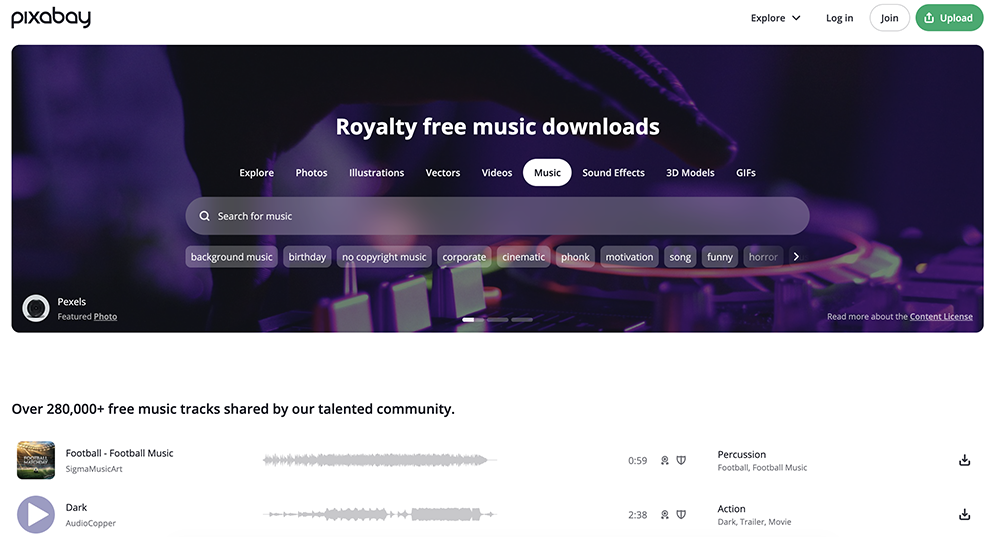
The browsing experience is simple and the catalog covers common production moods: cinematic, background, upbeat, ambient. For a creator who needs quick music for a non-monetized project, the workflow is fast. But it’s a stock-style library, not a creator community – there’s no artist to follow, no discovery mechanism, and no relationship between a track and the person who made it beyond the upload itself.
The risk (and it’s a real one) is structural. Because Pixabay has no vetting mechanism, the platform cannot verify whether any given track is already registered with YouTube’s Content ID system, or whether the uploader is the actual rights holder. That creates exposure that doesn’t exist on platforms with direct Content ID relationships.
Why Pixabay’s Open-Upload Model Costs More Than Just Claim Safety
The retroactive claim risk isn’t a random flaw in Pixabay’s system. It’s the direct result of an open-upload model where anyone can submit a track with no vetting attached. That same model shapes the catalog itself: Pixabay’s library is built for volume, not curation, which is why it skews toward generic production music rather than the kind of trending, artist-driven tracks that make a video feel current.
Thematic works the opposite way. Artists submit their own music directly because getting discovered through creator content is the whole incentive – a submission isn’t anonymous, and there’s a real person behind every track with a reason to keep it accurately registered.
That’s also why the catalog stays fresh: songs are added weekly and cycled off rather than accumulating indefinitely, and every video that uses a Thematic track gets featured across the platform, giving creators a discovery layer Pixabay simply doesn’t have.
What’s the actual difference between Pixabay’s catalog and Thematic’s?
Pixabay is an open-upload library: anyone can submit a track, so the catalog is large but generic, with no artist relationship behind it.
Thematic’s catalog is smaller by design – artists submit directly because they want their music discovered through creator content, and the community votes on which songs actually make it onto the platform. That’s also why using a Thematic track connects you to an actual artist you can follow, not just a download.
How Retroactive Content ID Claims Happen on Pixabay
This is the part of the Pixabay conversation that most creator guides skip: a track can be completely safe when you download it and still get claimed later, because Pixabay has no way to vet whether a track is already (or will later be) registered with Content ID.

YouTube’s Content ID system works by scanning uploaded videos against a database of registered audio fingerprints. When a match is found, the rights holder can claim the video – redirecting ad revenue, restricting playback, or blocking the video entirely. The standard creator assumption is: if a track is labeled “free to use,” it’s safe. That assumption is wrong when applied to open-upload libraries.
Here’s what actually happens: a track appears on Pixabay, labeled free and available. You download it, use it in a video, and publish. At the time of download, the track may not have been registered in Content ID. But the actual rights holder – or their distributor – can register the track at any time after that. When they do, Content ID scans every video across YouTube that contains a fingerprint match. Every video using that track receives a claim simultaneously, including yours, which was published months or years before the registration happened.
Thematic has observed this pattern directly: tracks that looked safe at download have gone on to be claimed retroactively across large numbers of videos at once.
Can Pixabay music get claimed on YouTube even if it’s labeled free?
Yes. A “free to use” label from Pixabay describes the download license, not the track’s Content ID status. If the track’s rights holder (or their distributor) registers it with Content ID after you published your video, YouTube will flag it automatically. Your Pixabay license gives you grounds to dispute it, but the dispute is manual and resolution is not guaranteed.
How Thematic Prevents the Same Risk
When a claim appears on a Pixabay-sourced video, Pixabay provides a guidance page and can be contacted for help disputing it. But Pixabay has no direct Content ID integration – it cannot communicate clearance to YouTube on your behalf. The dispute process is manual, the outcome is not guaranteed, and your video may be demonetized or restricted during the window while the dispute is pending.
Thematic is built to prevent this from happening in the first place. Every song stays registered with Content ID the whole time it’s on the platform – that’s the piece Pixabay’s open-upload model just doesn’t have. You get one license link per song, and it works for every video, so there’s no new code to track down each time you post. Just make sure it’s in each video’s description, since that’s what turns the protection on. That’s why the link is required on every upload, and why it keeps working even after you move on from Thematic.
For a deeper look at how Content ID works and why “no copyright” labels don’t always protect you: Is No-Copyright Music Actually Safe?
Does Thematic protect against Content ID claims?
Yes. Drop the license link in a video’s description and that video is covered. The same link works across every video that uses the song, so you’re never generating a new code, but each video still needs the link in its own description to be protected. And it’s not tied to your subscription – once a video’s protected, it stays that way for good.
Thematic vs. Pixabay: Pricing and Free Tier Breakdown
Both platforms have a free tier, but only one ties that free tier to Content ID protection. Here’s how the plans and pricing compare:
| Plan | Thematic | Pixabay Music |
|---|---|---|
| Free | Yes – full catalog access with license link | Yes – full library, no attribution |
| Paid | Premium: $9.99/mo or $79/yr / Pro: $24.99/mo | No paid plans |
| What paid unlocks | Premium tracks, additional features | N/A |
| Content ID protection | Yes (all tiers, license link required) | No (any tier) |
| Platforms | YouTube, TikTok, Instagram, podcasts, and more | Broad |
Pixabay is free with no paid option. Thematic’s free tier provides the same Content ID protection as paid tiers – the license link is what activates it, not the plan level.
What Thematic Has That Pixabay Doesn’t
Beyond Content ID protection, Thematic includes platform features a stock-style library like Pixabay was never built to offer.
Your Videos Get Promoted
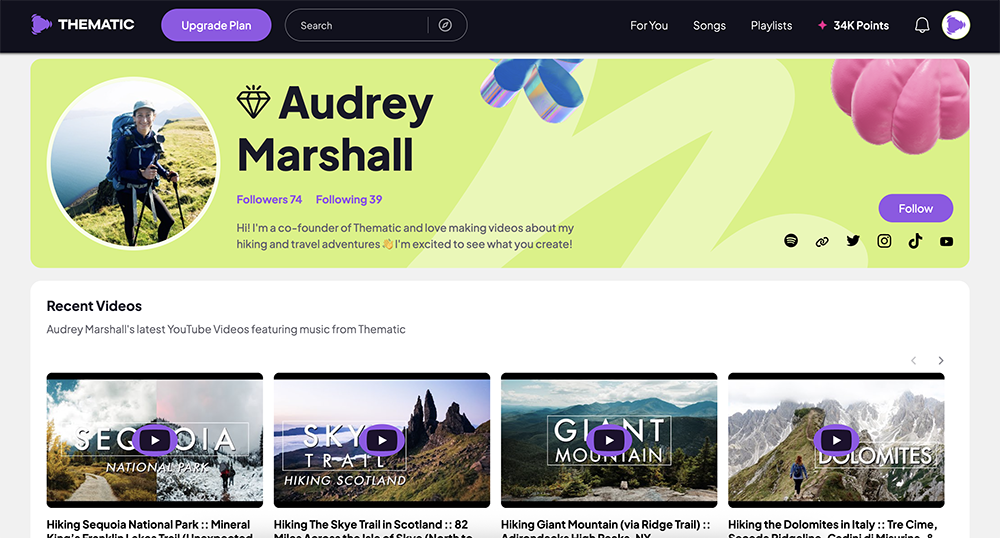
Every video published with a Thematic track gets featured across the Thematic platform, driving new viewers to your content. Pixabay is download and go – nothing comes back to you for using it.
Discovery Matched to Your Content
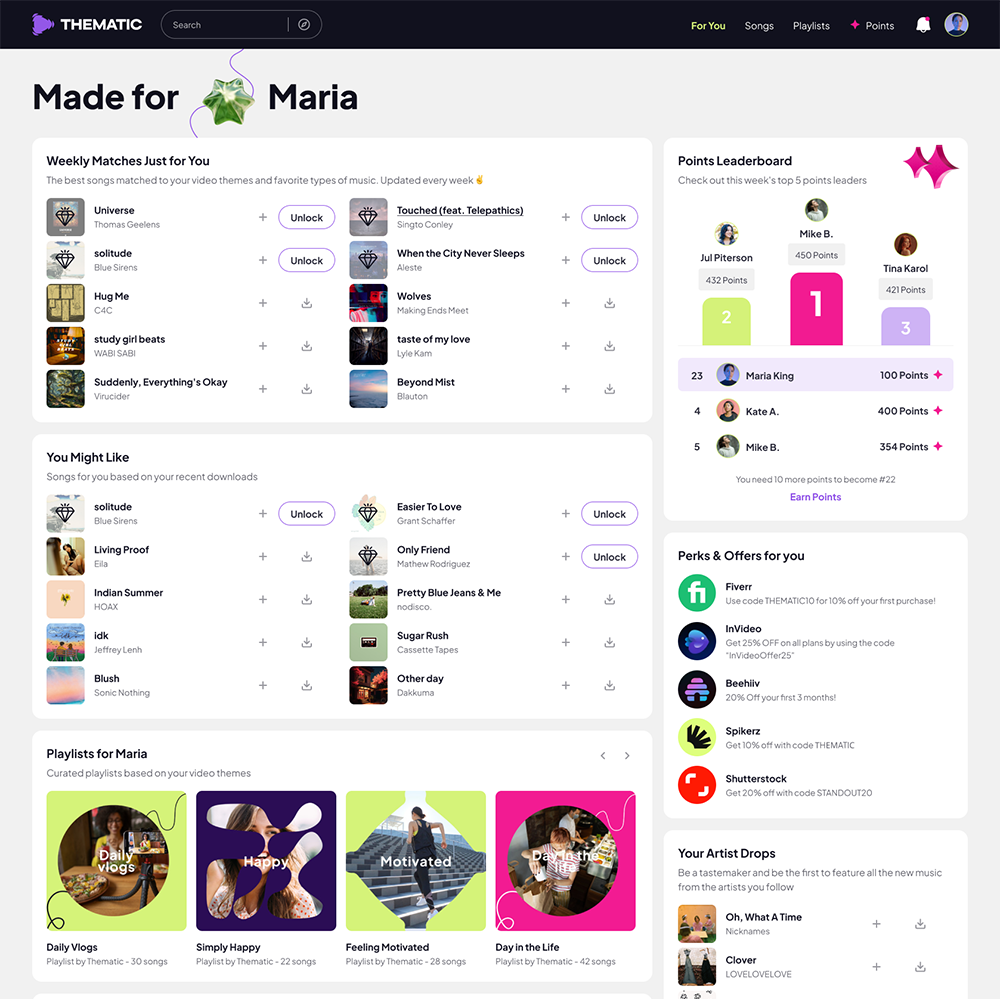
Thematic’s music, playlists, and perks are matched to your specific content style and preferences, so the catalog gets more relevant the more you use it. Pixabay’s search results look the same no matter who’s searching.
A Community Built Around Creators
1M+ creators connect around music on Thematic – you can browse what other creators are using, build a profile, and follow your favorite artists. Pixabay has no creator-facing community at all.
Creators Vote on What Gets Added
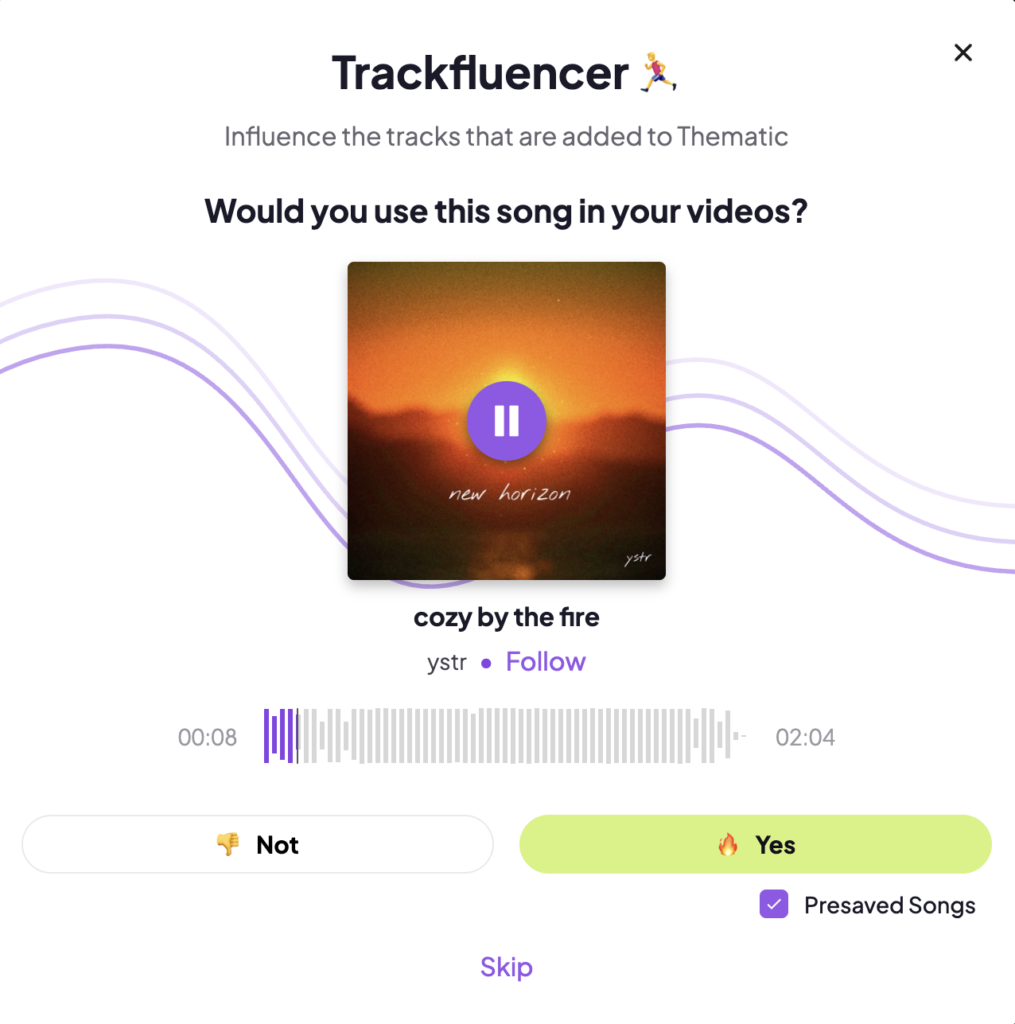
The community votes on which songs actually make it onto Thematic, so the catalog is shaped by the people using it. Pixabay’s catalog grows from anyone uploading, with no creator input on quality.
Creator Perks
Thematic creators get access to exclusive offers and discounts on other creator tools, on top of the music itself. Pixabay’s exchange starts and ends with the download.
Should You Use Thematic or Pixabay for Your YouTube Channel?
Use Thematic if:
- You run a monetized YouTube channel
- You publish content regularly across YouTube, TikTok, or Instagram
- Music quality and trendiness matter to your channel’s identity
- You want your music tied to an actual artist and discovery ecosystem, not just a download
- You want protection that holds permanently, not just while you’re subscribed
Pixabay may work if:
- You need music quickly for a non-monetized personal project
- You understand the retroactive claim risk and are willing to manage disputes manually if they arise
- You’re not building a long-term library of videos where a retroactive claim would be disruptive
The distinction matters most for creators with established channels and back-catalog videos. A retroactive claim doesn’t just affect the video you publish today – it affects every video you ever published using that track.
Common Questions: Thematic vs. Pixabay for YouTube
Straight answers to the questions creators ask most before choosing between the two – covering claim risk, credit requirements, and what happens to videos already published.
Is Pixabay music safe for YouTube?
Pixabay music is licensed for commercial use, including YouTube. But “licensed” and “safe from Content ID claims” are different things. Because Pixabay allows anyone to upload music without vetting Content ID registration status, tracks can be registered with Content ID by their actual rights holders after you’ve already used them – triggering retroactive claims on past videos. A Pixabay license gives you legal grounds to dispute a claim, but it doesn’t prevent the claim from appearing, and Pixabay has no direct Content ID integration to resolve it on your behalf.
What is a retroactive Content ID claim?
A retroactive claim is when a video you published in the past receives a copyright claim because the music you used was registered with Content ID after you published it. This is different from using music that was already known to be claimed. The risk is specific to platforms like Pixabay where uploaders are not vetted for Content ID registration status.
Is Thematic free to use?
Yes. Thematic’s free tier gives you access to the full catalog at no cost, no subscription required. Downloads run on a points system instead of a hard cap – you earn points by signing up, voting on new songs, and logging in daily, and each download uses some of those points. The only other requirement is including a license link for the song in your video description when you publish. Paid plans (Premium at $9.99/month or $79/year, Pro at $24.99/month) unlock premium tracks and additional features.”
Do I need to credit Pixabay in my video?
No. Pixabay’s license does not require attribution in your video or description. Thematic also does not require an on-screen credit or caption attribution. Thematic does require a license link in your video description – this is not an attribution credit, it’s the mechanism that activates that video’s license.
What happens to my old videos if a Pixabay track gets claimed?
All existing videos using that track receive a claim simultaneously – not just the video you published most recently. When a rights holder registers a track with Content ID, YouTube scans every video on the platform that contains a fingerprint match, regardless of when the video was published. If you have 20 videos using the same Pixabay track, all 20 could receive claims at once. That’s what makes the retroactive claim risk particularly significant for creators with established channels.
Can I use Thematic and Pixabay at the same time?
Yes. They’re not mutually exclusive. Some creators use Thematic as their primary source for regular YouTube content, where Content ID protection matters, and use Pixabay for lower-stakes personal projects. The practical consideration is building habits around knowing which tracks are covered by which protections.
Still Deciding?
If you’re evaluating other music platforms alongside Thematic:
- Best Free Music Websites for Creators – full comparison of all major free music sources, including Pixabay, YouTube Audio Library, Bensound, and more
- Is No-Copyright Music Actually Safe? – how Content ID works and why “royalty-free” labels don’t always prevent claims
- Thematic vs. Uppbeat – comparing the two main free-tier platforms for creators
- YouTube Audio Library vs. Thematic – the zero-requirement alternative to Thematic for YouTube-only creators
- How Thematic Works – the full explanation of the license link model and what it protects
Looking for more creator tools and resources? Visit Thematic’s Creator Toolkit for additional resources on creating content – including starting a YouTube channel, thumbnail and channel art templates, best practices, and of course, great royalty free songs to use in your videos for free with Thematic.