
Music transforms ordinary Instagram content into captivating experiences that stop the scroll. Whether you’re sharing a moment in Stories, creating an engaging Reel, or enhancing a standard post, the right soundtrack can amplify your message, evoke emotions, and boost engagement. But with Instagram’s various features and copyright considerations, knowing exactly how to add music to Instagram can feel confusing.
This comprehensive guide walks you through everything you need to know about how to add music to Instagram content. You’ll learn step-by-step methods for every content type, discover how to navigate copyright issues, and find solutions to common problems. By the end, you’ll be equipped to create professional, engaging content that resonates with your audience – all while staying within Instagram’s guidelines 💪
Table of Contents
- Why Adding Music to Instagram Matters
- How to Add Music to Instagram Stories
- How to Add Music to Instagram Reels
- How to Add Music to Instagram Posts
- Get Copyright-Safe Music with Thematic
- Understanding Instagram’s Music Library
- Copyright Considerations for Using Music on Instagram
- Troubleshooting Common Music Issues
- Tips for Choosing the Right Music
- FAQs about using Music on Instagram
Why Adding Music to Instagram Matters
Music isn’t just background noise – it’s a powerful tool that directly impacts how your audience engages with your content. Videos with music receive significantly higher engagement rates than those without. The right track can set the mood, reinforce your brand identity, and make your content more memorable.
For creators, music serves multiple strategic purposes:
- Emotional Connection: Music triggers emotional responses that help viewers connect with your content on a deeper level. An upbeat track energizes your audience, while a mellow song creates intimacy and reflection.
- Algorithm Boost: Instagram’s algorithm favors content that keeps users on the platform longer. Engaging music encourages viewers to watch your entire video, signaling to Instagram that your content is valuable and should be shown to more people.
- Trending Participation: Using popular sounds in Reels can expose your content to broader audiences. When users search for or engage with trending audio, your content has the opportunity to appear in those discovery feeds.
- Brand Recognition: Consistent use of specific music styles or genres helps establish your unique content identity. Your audience begins to associate certain sounds with your brand, creating a cohesive and recognizable presence.
How to Add Music to Instagram Stories
Instagram Stories offer the most straightforward way to add music to Instagram content. The built-in Music sticker gives you access to millions of licensed tracks that you can seamlessly integrate into your 24-hour Stories.
📋 Step-by-Step Guide for How to Add Music to Instagram Stories
Step 1: Create Your Story
Open Instagram and tap the camera icon in the top-left corner or swipe right from your feed. Capture a photo or video, or upload content from your camera roll by swiping up.
Step 2: Access the Music Sticker
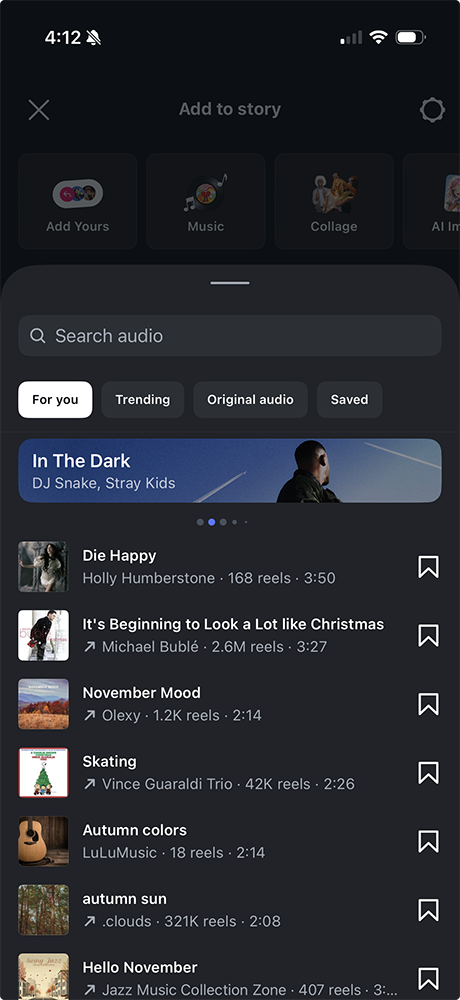
After capturing or selecting your content, tap the sticker icon at the top of the screen (the square smiley face). Scroll through the sticker options and select “Music.”
Step 3: Search for Your Track
Browse through Instagram’s featured music, explore by mood or genre, or use the search bar to find a specific song or artist. Instagram’s library includes millions of tracks across all genres.
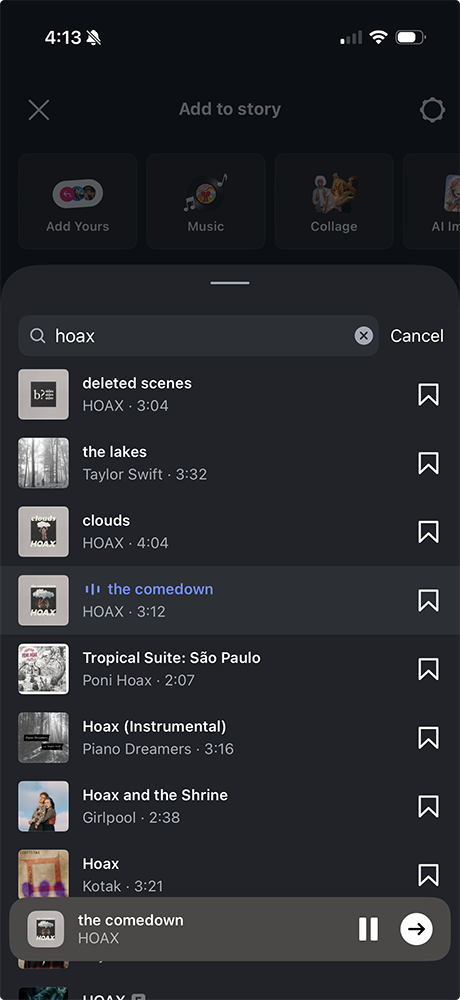
Step 4: Customize Your Music Selection
Once you’ve chosen a song, you can customize several elements:
- Select the portion of the song: Drag the audio wave slider to choose which 15-second segment plays
- Choose display style: Select how the music appears on your Story (album art, lyrics, sticker style)
- Adjust placement: Move and resize the music sticker anywhere on your screen
- Set the song length: Choose to play the music for the entire Story duration or a shorter clip
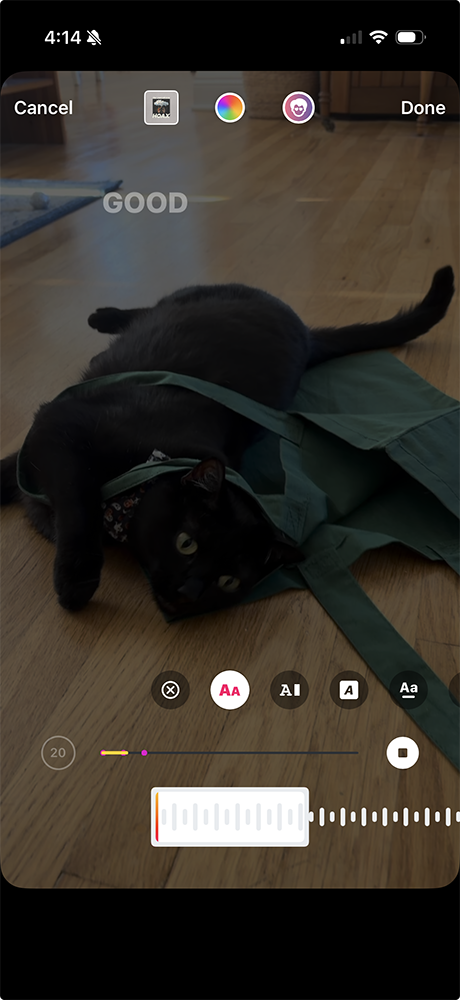
Step 5: Share Your Story
Review your Story with the music, make any final adjustments, and tap “Your Story” to publish. Your followers will see and hear the music when they view your Story.
✅ Pro Tips for Using Music on Instagram Stories
- Match music to content: Choose upbeat tracks for active content and mellow songs for reflective moments
- Use lyrics strategically: Position lyric stickers to emphasize specific words that reinforce your message
- Layer multiple elements: Combine music with other stickers, text, and effects for richer storytelling
- Test audio levels: Ensure your music doesn’t overpower your voice if you’re speaking in the Story
How to Add Music to Instagram Reels
Reels are Instagram’s primary short-form video feature, and music is central to their success. Unlike Stories, Reels remain on your profile permanently and have significant discovery potential through the Explore page and Reels feed.
📋 Step-by-Step Guide for How to Add Music to Instagram Reels
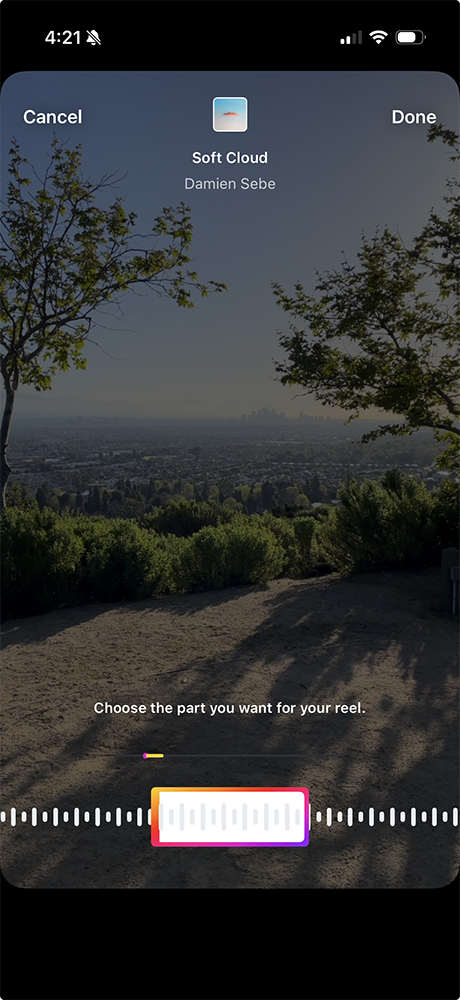
Step 1: Start Creating a Reel
Tap the “+” icon at the bottom of your Instagram screen, then select “Reel.” Alternatively, swipe right from your feed and select the “Reels” option at the bottom.
Step 2: Add Music Before or After Recording
You can add music at any point in the creation process. To add music before recording, tap the “Audio” or music note icon on the left side of the screen. To add music after recording, complete your video first, then tap the music icon.
Step 3: Choose Your Audio
Search Instagram’s music library by song title, artist, or trending sounds. You can also browse curated collections or explore what’s trending. Pay attention to tracks labeled “Trending” with an upward arrow (these have higher discovery potential).
Step 4: Select Your Clip
Once you’ve chosen a track, drag the audio wave to select which portion of the song you want to use. Reels can be 15, 30, 60, or 90 seconds long, so choose a segment that fits your video length.
Step 5: Record or Edit Your Video
If you added music first, record your video with the audio playing so you can sync your movements or edits to the beat. If you’re uploading pre-recorded footage, use Instagram’s editing tools to trim and arrange clips to match the music.
Step 6: Fine-Tune and Publish
Add effects, text, stickers, and filters to enhance your Reel. Write a compelling caption with relevant hashtags, tag your location, and share your Reel to your feed and the Reels tab.
⚡️ Maximizing Instagram Reels with Music
- Leverage Trending Sounds: Using popular audio increases your chances of appearing on the Explore page. When a sound is trending, Instagram may push your content to users who engage with that audio.
- Original Audio Strategy: If you create original audio that goes viral, other users can use your sound in their Reels, creating a network effect that drives traffic back to your original post and profile.
- Sync Transitions to Beats: Professional-looking Reels often feature cuts and transitions that align with music beats. This creates a polished, engaging viewing experience that keeps audiences watching.
- Consider Audio Quality: If recording with the music playing, ensure your environment is quiet enough that the audio comes through clearly without distortion.
How to Add Music to Instagram Posts
Adding music to regular Instagram posts (feed posts) is less straightforward than Stories or Reels because Instagram doesn’t offer a native music feature for static posts or standard video posts. However, you have several options to include music in your feed content.
☝️ Method 1: Add Music to Instagram Videos Before Uploading
The most reliable way to add music to Instagram posts is to edit the audio into your video before uploading:
Step 1: Use a Video Editing App
Edit your video using a third-party app like InShot, CapCut, Adobe Premiere Rush, or iMovie. Import your video and add your chosen music track as a separate audio layer.
Step 2: Adjust Audio Levels
Balance the music volume with any original audio in your video. Ensure voices or important sounds aren’t drowned out by background music.
Step 3: Export and Upload
Save the edited video to your device, then upload it to Instagram as a regular post. The music will be embedded in the video file.
✌️ Method 2: Share a Reel as a Post
Instagram allows you to share Reels to your main feed, which gives you access to Instagram’s music library:
Step 1: Create Your Content as a Reel
Follow the Reels creation process outlined above, adding music from Instagram’s library.
Step 2: Share to Feed
When publishing, ensure the “Also share to Feed” option is toggled on. Your Reel will appear as a regular post in your followers’ feeds while maintaining the audio.
📌 Important Considerations for Feed Posts
When you add music to Instagram feed posts using Method 1 (pre-editing), you must ensure you have the proper rights to use that music. Instagram’s copyright system may mute your video if it detects copyrighted music you’re not licensed to use. This is where using copyright-safe music becomes essential.
Get Copyright-Safe Music for Instagram with Thematic
Creating engaging Instagram content consistently means you need a reliable source of high-quality, copyright-safe music. Copyright strikes can mute your videos, reduce your reach, or even result in account penalties (problems that can derail your content strategy and waste hours of editing work).
🎵 Why Thematic Is Your Instagram Music Solution
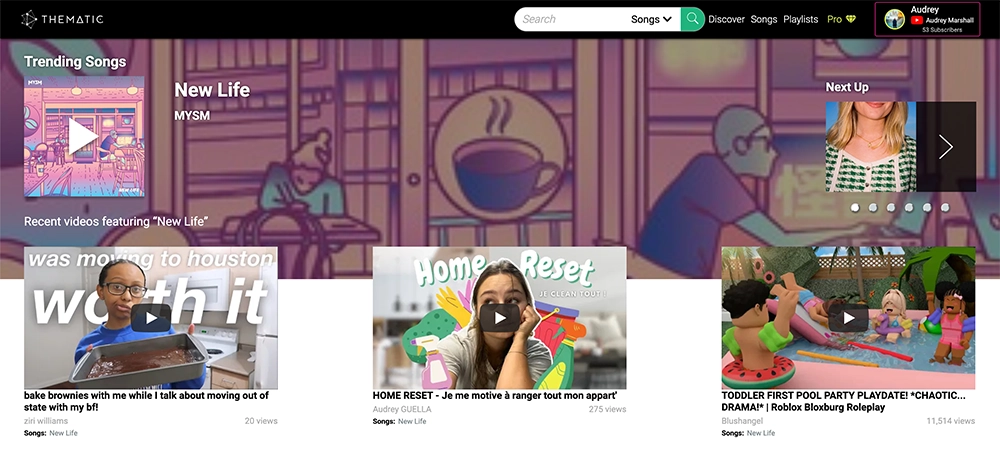
Thematic provides creators with access to thousands of trending, professional-quality tracks that are completely copyright-safe for Instagram. Here’s how Thematic empowers your content creation:
Never Worry About Copyright Issues: Every track in Thematic’s library is cleared for use on Instagram. You’ll never face muted videos, content takedowns, or copyright strikes (even on videos you posted months or years ago). This protection means you can build a sustainable content library without the fear of re-editing old posts.
Save Hours in Your Editing Process: Instead of searching through multiple platforms for the right track, verifying licenses, and worrying about attribution requirements, Thematic gives you immediate access to safe music. Browse by mood, genre, or trending status, then download and use tracks in minutes. This streamlined workflow helps you publish content faster and more consistently.
Access Trending Music: Thematic’s library includes trending sounds that help your content gain visibility in Instagram’s algorithm. You’ll have access to popular music styles that resonate with audiences while staying completely copyright-compliant.
Professional Sound Quality: All tracks are professionally produced, ensuring your content sounds polished and premium. High-quality audio elevates your entire production value, making your posts more engaging and shareable.
Simple Licensing: No complex attribution requirements or confusing licensing terms. Thematic handles the legal complexity so you can focus on creating.
👍 Getting Started with Thematic
Visit Thematic to explore the music library and start using copyright-safe tracks in your Instagram content today. Whether you’re creating Stories, Reels, or feed posts, Thematic ensures your music choices support your growth instead of limiting it.
Understanding Instagram’s Music Library
Instagram’s built-in music library contains millions of licensed tracks that you can use in Stories and Reels without copyright concerns. However, understanding how this library works helps you make strategic music choices.
What’s Available in Instagram’s Music Library?
Instagram has licensing agreements with major record labels and publishers, giving you access to:
- Popular chart-topping hits from mainstream artists
- Emerging artists and independent musicians
- Curated playlists organized by mood, genre, and activity
- Trending sounds that are currently popular on the platform
- Original audio created by other Instagram users
Regional Availability Limitations
Music availability varies by country due to licensing restrictions. A song available in the United States might not appear for users in other countries. This geographic limitation is why some users experience restricted music libraries or can’t find specific tracks.
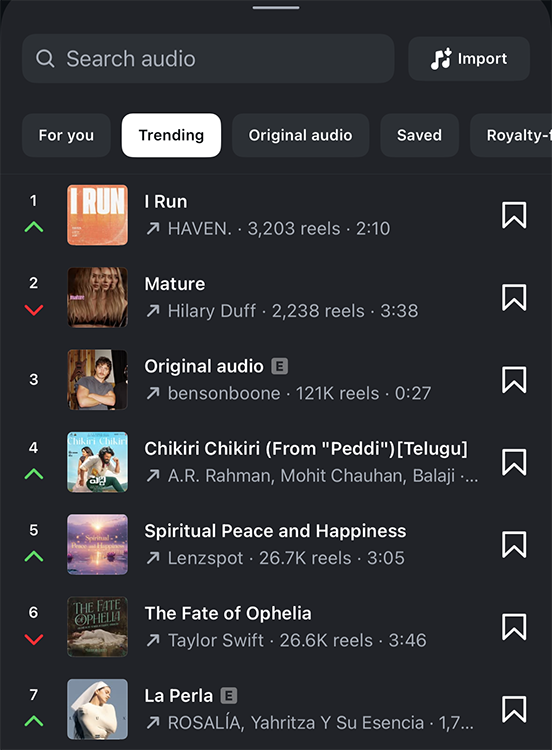
How Instagram Categorizes Music
Instagram organizes music into several browsable categories:
- Trending: Currently popular tracks on Instagram
- Moods: Happy, sad, romantic, energetic, chill, and more
- Genres: Pop, hip-hop, rock, country, electronic, and others
- For You: Personalized recommendations based on your usage
- Themes: Workout, party, throwback, seasonal content
Understanding these categories helps you efficiently find the right music for your content without endless scrolling.
Copyright Considerations for Instagram Music
Copyright protection exists to ensure musicians and creators are compensated for their work. When you add music to Instagram, you must respect their copyright policy to avoid penalties and maintain your account’s good standing.
When Instagram’s Built-In Music Is Safe
Music added through Instagram’s native Music sticker (in Stories) or Audio feature (in Reels) is pre-licensed for use on the platform. Instagram has already secured the rights, so you can use these tracks without additional permissions or attribution.
When You Need Additional Rights
If you plan to add music to Instagram posts through external editing (Method 1 from the earlier section), you need to ensure you have proper licensing:
- Commercial vs. Personal Use: If you’re using Instagram for business purposes, promoting products, or earning income from your content, you may need commercial licensing even for royalty-free music.
- Music You Don’t Have Rights To: You cannot use copyrighted music from streaming services, YouTube downloads, or purchased tracks unless you have explicit permission or a proper license for social media use.
- Cover Songs and Remixes: Even if you create your own performance of a copyrighted song, you still need licensing for the underlying composition.
Consequences of Copyright Violations
Instagram’s copyright system automatically detects copyrighted music in uploads. Violations can result in:
- Videos being muted, removing your audio entirely
- Content being removed from your profile
- Reduced reach and algorithmic suppression
- Account warnings or temporary restrictions
- Permanent account suspension for repeat offenses
These consequences make using copyright-safe music sources like Thematic essential for sustainable growth 📈
Troubleshooting Common Instagram Music Issues 🚨
Even when following all the steps correctly, you may encounter issues when trying to add music to Instagram. Here are solutions to the most common problems.
Why Can’t I Add Music to my Instagram Story?
❌ Business Account Limitations: Instagram business accounts often have restricted access to music due to commercial usage rights.
✔️ Solution: Switch to a Creator account in your settings, which typically has fuller music access while maintaining business features.
❌ Regional Restrictions: Your location may limit music availability.
✔️ Solution: Use a VPN to access different regional libraries, or rely on copyright-safe external music sources.
❌ App Version Outdated: Old versions of Instagram may not support current music features.
✔️ Solution: Update Instagram to the latest version through your app store.
❌ Account Age or Violations: New accounts or accounts with previous copyright strikes may have limited music access.
✔️ Solution:Wait for account maturation or address any pending violations.
Why Is My Instagram Music Not Working?
❌ Internet Connection: Music features require stable internet to load the library.
✔️ Solution: Switch between Wi-Fi and cellular data or move to a location with stronger signal.
❌ Cache and Data Issues: Corrupted app data can prevent music from loading.
✔️ Solution: Clear Instagram’s cache (Settings > Apps > Instagram > Clear Cache on Android, or reinstall the app on iOS).
❌ Instagram Server Issues: Occasional platform-wide outages affect music features.
✔️ Solution: Wait a few hours and try again, or check Instagram’s status on sites like DownDetector.
Why Was My Music Removed or Muted?
❌ Copyright Detection: Instagram’s system identified copyrighted music you didn’t have rights to use.
✔️ Solution: Use Instagram’s built-in library, Thematic, or other licensed sources going forward.
❌ Account Type Change: Switching from personal to business account can retroactively mute videos.
✔️ Solution: Review your account type and understand its music limitations before posting.
❌ Geographic Restrictions: Music licensed for your region when posted may become unavailable.
✔️ Solution: Use consistently available music sources or download your content before potential restrictions.
Tips for Choosing the Right Music for Instagram
Selecting the perfect track for your content is an art that combines strategic thinking with creative intuition. The right music choice can double your engagement, while the wrong track can cause viewers to scroll past.
Match Music to Content Purpose
- Educational Content: Use subtle, non-distracting background music at lower volumes that doesn’t compete with your voice or on-screen text.
- Energetic Content: Choose upbeat, fast-tempo tracks for workout videos, dance content, or motivational posts that aim to inspire action.
- Emotional Storytelling: Select melodic, slower tracks with emotional depth for personal stories, testimonials, or vulnerable sharing.
- Comedy and Entertainment: Pair your content with playful, quirky sounds or leverage trending audio that viewers already associate with humor.
Consider Your Audience Demographics
Different audiences respond to different music styles:
- Younger audiences (Gen Z) tend to engage more with trending TikTok-style sounds and current chart hits
- Millennial audiences respond well to nostalgic throwbacks and indie/alternative sounds
- Professional audiences prefer subtle, sophisticated background music that doesn’t overpower the message
- International audiences may have different musical preferences based on cultural backgrounds
Leverage Trending Audio Strategically
While trending sounds can boost discoverability, they shouldn’t be your only strategy:
- When to Use Trending Audio: When you can authentically create content that fits the trend, when you’re prioritizing reach over brand consistency, or when starting a new account that needs initial traction.
- When to Use Original/Niche Audio: When building a distinctive brand identity, when targeting a specific niche community, or when your content requires specific mood-setting music.
Test and Analyze Performance
Pay attention to how different music choices affect your metrics:
- Track engagement rates for posts with different music styles
- Note which tracks lead to saves, shares, and longer watch times
- Identify patterns in your best-performing content’s audio choices
- Use Instagram Insights to understand your audience’s preferences
FAQs about using Music on Instagram
Below are answers to the most common questions creators ask about adding music to Instagram. These quick solutions address technical issues, copyright concerns, and platform-specific limitations.
Can you add music to Instagram photos?
You cannot add music to static photo posts in your main feed. However, you can add music to photo Stories using the Music sticker. If you want a photo in your feed with music, create it as a Reel (which can be a static image) and add audio through Instagram’s music library, then share it to your feed.
Why don’t I have the music feature on Instagram?
The most common reasons include having a business account (switch to Creator account), living in a region with limited music licensing, using an outdated app version, or having a new account that hasn’t been granted full feature access yet. Try updating your app, checking your account type, and waiting 24-48 hours if your account is very new.
How do I add my own music to Instagram?
To add custom music you’ve created or have rights to use, edit it into your video using a video editing app before uploading to Instagram. For Reels, you can also record audio directly in the app, and if your Reel becomes popular, your original audio may become available for others to use. Always ensure you have rights to any music you upload.
Can I use Spotify music on Instagram?
You cannot directly import music from Spotify to Instagram. However, many songs available on Spotify are also in Instagram’s music library. Search for the artist or track name in Instagram’s Audio feature to see if it’s available. If not, you’ll need to use licensed music from platforms like Thematic or other copyright-safe sources.
What happens if I use copyrighted music on Instagram?
Instagram’s content ID system may mute your video, remove the audio entirely, or take down the post. Repeated violations can result in account warnings, reduced reach, temporary restrictions, or permanent account suspension. Using copyrighted music without proper licensing also exposes you to potential legal action from rights holders.
How long can music be on Instagram Reels?
Instagram Reels can be up to 90 seconds long, and you can use music for the entire duration. When selecting audio from Instagram’s library, you can choose which portion of the song to use by dragging the audio wave slider to your desired starting point.
Do I need to credit music on Instagram?
When using music from Instagram’s built-in library, no additional credit is required – Instagram automatically displays the track name and artist. If you’re using externally sourced music (like from Thematic), follow the platform’s attribution requirements, though many copyright-safe music platforms don’t require specific credit formats for social media use.
Can business accounts use Instagram music?
Business accounts often have limited access to Instagram’s music library due to commercial usage restrictions. Many businesses switch to Creator accounts, which offer similar business features (insights, contact buttons, ad capabilities) while maintaining fuller access to music features. Check your account settings to determine which type best serves your needs.
Elevate Your Instagram Content with Music
Adding music to Instagram posts, Stories, and Reels is no longer optional for creators who want to maximize engagement and grow their audience. Music creates emotional connections, boosts algorithmic performance, and transforms ordinary content into memorable experiences that resonate with viewers.
By following the step-by-step processes outlined in this guide, you now have the knowledge to confidently add music to Instagram across all content types (Stories, Posts, and Reels). Whether you’re using Instagram’s built-in music library, creating Reels with trending sounds, or enhancing feed posts with external audio, you’re equipped to make strategic music choices that support your content goals.
Keep in mind that copyright compliance isn’t just about avoiding penalties – it’s about building a sustainable content strategy that protects all your hard work. Using platforms like Thematic ensures you’ll never waste time re-editing old videos or worrying about sudden copyright strikes that could damage your account.
Start experimenting with different music styles, pay attention to what resonates with your audience, and don’t be afraid to try both trending sounds and unique tracks that reflect your brand identity. Your perfect soundtrack is out there, and with these tools and strategies, you’re ready to find it and create Instagram content that truly stands out.
👉 Ready to access copyright-safe music for all your Instagram content? Visit Thematic and start creating with confidence today.
Looking for more free creator tools and resources? Visit Thematic’s Creator Toolkit for additional resources on creating content – including thumbnail and channel art templates, best practices, and of course, great royalty free songs to use in your videos for free with Thematic.

This guide on How to Add Music to Instagram is brought to you by Thematic Co-Founder & COO Audrey Marshall
With a background in entertainment PR (via Chapman University), Audrey has led digital strategy for music artists, content creators, and brands. From brand campaigns for Macy’s, American Cancer Society, and the L’Oréal luxe family of brands, to music-driven influencer marketing campaigns for Interscope Records, Warner Music, AWAL, and Taboo of the Black Eyed Peas (featuring creators such as Lexy Panterra, Blogilates, Mandy Jiroux, Matt Steffanina, and Seán Garnier), she is an expert in navigating the influencer marketing space. Audrey has also developed and managed some of the leading beauty, lifestyle, and dance channels on YouTube.
Certified across the board with YouTube, Audrey has a specific focus on digital rights management for music assets, running multiple SRAV-enabled CMS. She is passionate about working with other builders in the space for a more transparent digital rights ecosystem.
At Thematic, Audrey leads the product team and oversees operations. She has driven partnerships with leading talent and music companies, including Songtrust, Kobalt/AWAL, Select Management, BBTV, ipsy, and Black Box, and has helped the platform grow to a thriving community of 1M+ content creators who have posted 1.6M+ videos using the platform, driving 60B+ music streams and $120M+ in earned media value for independent music artists.